CosmicNav
Alexandr Degteari

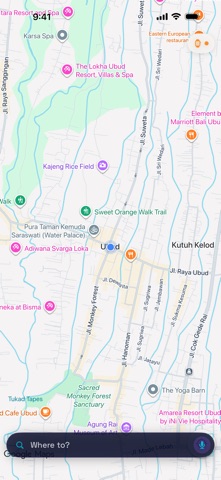
Your Apple Watch finally shows a real map. Not turn cards. Not a list of street names. The actual map — roads, buildings, your route — drawn on your wrist and moving as you ride. WHY THIS EXISTS There is no maps SDK for watchOS, so no app draws a real map there. Even the big ones show you an arrow and a street name. We wrote our own renderer: the watch pulls map tiles itself and draws them. What you see on your wrist is a genuine map, not a photo of your phone screen. WORKS WITH THE PHONE IN YOUR POCKET Screen off, phone away, engine running. The watch keeps drawing and the voice keeps talking. Nothing goes quiet when the display sleeps. THE CROWN IS A REAL ZOOM Turn it and the map loads finer tiles — lanes and alleys appear that were not there a second ago. It is not a magnifying glass over a blurry picture. SEARCH BY VOICE FROM YOUR WRIST Say where you are going. The route is built and guidance starts. You never take the phone out. BUILT FOR TWO WHEELS Routes are calculated for scooters and motorcycles, so they take paths a car cannot. On islands and in old towns that is the difference between ten minutes and forty. THREE MAP STYLES Cosmic for night rides. Light when the sun is brutal. Black for maximum contrast and the least battery drain on an OLED screen. Switch right from the watch without stopping. VOICE THAT KEEPS TALKING Turn prompts arrive before the maneuver, not on top of it. Speech survives phone calls and other apps taking over the audio. Requires iPhone with iOS 17 and Apple Watch with watchOS 10 or later. An internet connection is needed while riding.
Screenshots