Controller Pro for SoundTouch
John Why

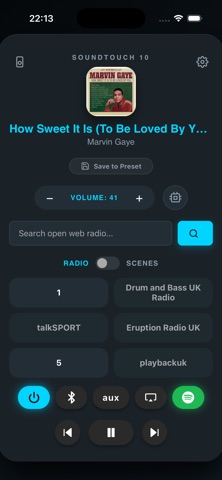
Take back total control of your Bose SoundTouch® audio system—now with Direct Wi-Fi Internet Radio out of the box, no Bluetooth required! Controller Pro is a fast, local-first Wi-Fi remote and ecosystem manager engineered to keep your SoundTouch® speakers, Wave® systems, soundbars, and home cinema systems running at peak performance over your home Wi-Fi. WORKS IMMEDIATELY OUT OF THE BOX (STANDALONE REMOTE MODE) • NEW Direct Wi-Fi Internet Radio (No Bluetooth Needed!): Search and stream thousands of live global radio stations directly to your speaker over Wi-Fi via UPnP. Your speaker pulls the stream directly from your router—meaning zero Bluetooth compression, zero phone call interruptions, zero phone battery drain, and full Wi-Fi radio restored even on 1st-Gen (Series I) SoundTouch 20, 30, and Wave systems without Bluetooth! • Smart Hybrid Audio Fallback: If a station uses a locked-down stream format, the app automatically detects it in seconds and bridges the audio via AirPlay or Bluetooth so you never hit a dead stream. • 6 In-App Presets & Unlimited Favourites: Save open web radio stations and local media to the 6 in-app preset buttons, plus store unlimited station Favourites. • V10 Hybrid Network Radar: Automatically discovers your SoundTouch speakers over Wi-Fi—with manual IP and subnet override for complex or multi-VLAN networks. • Multi-Room Grouping & Scenes: Create and manage multi-room zones, sync master volumes, control Left/Right Stereo Pairs, and launch whole-house Audio Scenes with one tap. • Surround Sound Calibration Desk: Dedicated mixer for compatible SoundTouch soundbars and home cinema systems to fine-tune center channel, bass module, treble, and rear surrounds. • Expanded NAS, DLNA & Source Control: Browse up to 1,000 items per folder on previously mounted NAS/DLNA drives (Plex, Synology, FRITZ!Box) and switch between AUX, TV/HDMI, AirPlay, Bluetooth, and Spotify Connect. COMPANION BRIDGE & NODE INTEGRATION (v9.2+) Controller Pro also serves as the companion control app for existing Controller Cloud accounts and local Controller Cube hardware nodes (Raspberry Pi, NanoPi, Home Assistant, or turnkey appliance). Linking your speakers over Wi-Fi to a configured node unlocks hardware-level features: • Hardware Preset Restorer: Press physical buttons 1–6 directly on your speaker or Bose remote to play saved radio stations and NAS music—even with your phone switched off. • Native TuneIn & Live HLS Transcoding: Stream 100,000+ stations and custom audio URLs (.mp3, .aac, .m3u8 HLS) directly on the speaker with full OLED display metadata. • Mount New NAS Drives & Create Stereo Pairs: Pair new SMB and UPnP/DLNA music libraries on your network, and bond two SoundTouch 10 speakers into a Left/Right stereo pair. • Whole-Household Auto-Sync: Up to 8 phones and tablets in your home automatically inherit your physical presets, recents, and media drives. COMPATIBLE HARDWARE • SoundTouch 10, 20 (Series I, II, III), 30 (Series I, II, III) & SoundTouch Portable • Wave SoundTouch Music System (Series I & IV) • SoundTouch 300 Soundbar & CineMate / SoundTouch 120, 130, 220, 520 Home Cinema • Lifestyle SoundTouch 535, 525, 235, 135, 550, 600 & 650 Systems • SoundTouch Wireless Link Adapter, SA-4 & SA-5 Amplifiers PRIVACY-FIRST & 10 NATIVE LANGUAGES • Zero Telemetry: No third-party analytics SDKs, ad trackers, or profiling. • 10 Languages Built-In: English, French, Spanish, German, Italian, Portuguese, Tagalog, Chinese, Japanese, and Arabic (RTL). Disclaimer: Controller Pro is an independent project developed in London, UK, and is not affiliated with, endorsed by, or sponsored by Bose Corporation. Bose®, SoundTouch®, Wave®, and Lifestyle® are registered trademarks of Bose Corporation.
Screenshots