Shortcuts Debugger
Chi Thang Duong

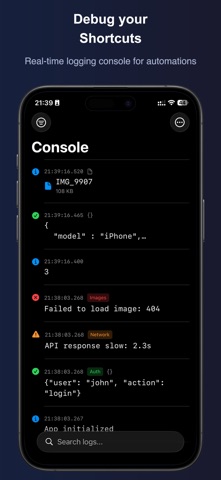
Shortcuts Debugger is a powerful debugging console for Apple Shortcuts. Track, filter, and analyze log messages from your automations in real-time. CONSOLE LOGGING Write messages directly from your Shortcuts and view them instantly as your automations run. No more Quick Look actions cluttering your workflows. LOG LEVELS Categorize your logs as Info, Success, Warning, or Error. Each level is color-coded for quick visual identification. TAGGING SYSTEM Organize log entries with custom tags. Filter by tags to focus on specific parts of your automation. CONTENT DETECTION JSON and dictionary outputs are automatically detected and formatted. Log images and file metadata with dedicated actions. ADVANCED FILTERING Filter logs by: • Search text • Log level (Info, Success, Warning, Error) • Content type (Text, JSON, Image, File) • Date range (Today, Last 7 days, Custom) • Device name • Custom tags SHORTCUTS ACTIONS • Log Message - Basic logging with level and tag • Log Conditional - Log different messages based on conditions • Log Device Details - Capture device info automatically • Log Files - Record file metadata • Log Images - Log image thumbnails • Log Internet Connection - Check and log connectivity • Output Messages - Export logs as Markdown • Start/Stop Logging - Toggle logging on or off • Clear Messages - Delete all logs URL SCHEME Deep link into the app with filters pre-applied. Perfect for automation workflows. EXPORT Export your filtered logs as Markdown for sharing or documentation. Whether you're building complex automations or debugging a simple shortcut, ShortcutDebugger gives you the visibility you need. ALSO FROM TURNTIDE Shortcuts Editor — see any shortcut as a flowchart and edit it visually.
Screenshots