App Icon Extractor
Florian Schimanke

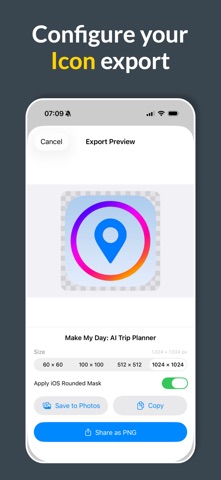
Get any app's icon in seconds — in full resolution, ready to use. Whether you're building a presentation, writing a blog post, designing a comparison chart, or simply need a clean version of an app's icon, App Icon Extractor gives you instant access to high-quality icons from the entire App Store catalog. WHAT YOU CAN DO Search for any iPhone, iPad, or Mac app by name and instantly preview its icon in full detail. Choose from multiple sizes — from compact 60×60 thumbnails up to crisp 1024×1024 originals — and export exactly what you need. Every icon can be shared as a PNG file, saved directly to your photo library, or copied to the clipboard for immediate use in your favorite design tool. Want the icon to look exactly like it does on your Home Screen? Toggle the iOS rounded mask to apply the authentic superellipse shape. Prefer the raw square version? That's the default. YOUR ICONS, YOUR WAY ◦ Preview icons at 60, 100, 512, or 1024 pixels ◦ Export as lossless PNG in any of those sizes ◦ Apply or remove the iOS corner mask with one tap ◦ Share via AirDrop, Messages, Mail, or any other app ◦ Save to Photos or copy to clipboard instantly ◦ Browse icons from over 60 App Store regions worldwide BUILT FOR EVERYONE Designers use it to grab reference icons for mockups and pitch decks. Developers use it to compare their icon against competitors. Bloggers and journalists use it to illustrate app reviews. Teachers use it to create guides and tutorials. No login required. No subscription. No ads. Just search, preview, and export. SAVE YOUR FAVORITES Found an icon you love? Tap the heart to save it for later. Your favorites are always just one tap away — perfect for building an icon collection or revisiting apps you've researched before. WORKS WHERE YOU WORK App Icon Extractor is designed for both iPhone and iPad. On iPad, the split-view layout gives you a spacious workspace with sidebar navigation — ideal for browsing and exporting multiple icons in one session. The app respects your device settings: dates, numbers, and file sizes are formatted according to your locale preferences. Available in 12 languages.
Screenshots