Cebbin: Expense Tracker
Enmera

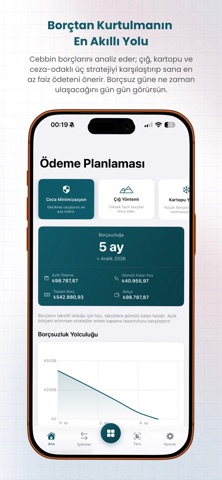
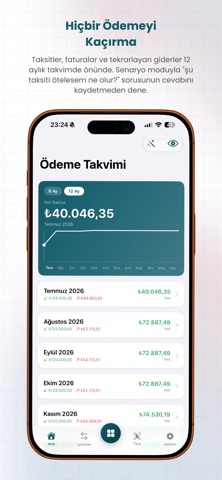
Cebbin combines your personal finances and small business in a single app, powered by AI. Most apps only manage budgets or only do basic accounting; Cebbin does both. Personal Finance - Track income and expenses by category. Recurring expenses like rent, subscriptions, and bills are automatically generated each month. - Break down installment payments; see your payment schedule and cash flow. - Set budget limits and receive alerts for overspends. Only expenses you actually pay are added to your budget. - Overdue and upcoming payments are always in front of you. AI - AI Debt Planner: Compares snowball, avalanche, and penalty-prevention strategies, and calculates your debt-free date. - Cebbin AI Chat: Ask questions based on your own data and receive personalized advice. - Smart insights: expense analysis and savings opportunities. Reports - Cash flow, profit/loss, category breakdown, and trends. - Projections for the coming month and the "where did the money go" flow breakdown. Markets & Portfolio - Watch live gold, currency, crypto, and stock prices. - Add your portfolio; see total value and profit/loss in real time. Business - Current account, VAT invoice, inventory, personnel (payroll & leave), tax calendar, checks/bills, fixed assets, cash, and bank accounts. Why Cebbin? - Personal budget + business + artificial intelligence in one place. - Multi-currency; records in different exchange rates are accurately collected. - Turkish, English, and German. Your data is securely stored, and your session is encrypted. Note: Market data and AI recommendations are for informational purposes only; they are not investment advice. Terms of Use: https://cebbin.com/en/terms-of-use Privacy Policy: https://cebbin.com/en/privacy-policy
Screenshots