OpenWRT Manager
ZhenHua Wu

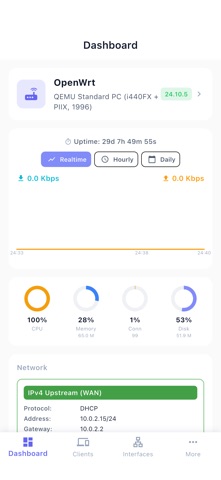
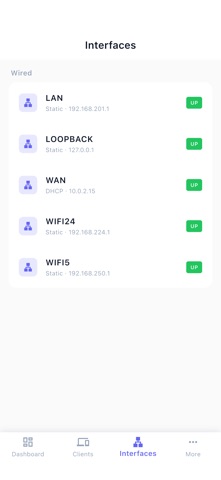
Take full control of your OpenWrt router — right from your iPhone. OpenWrt Manager is a native iOS app for home network administrators, parents, and power users who want complete visibility and control over every device on their local network. Smart Notifications That Reach You Anywhere • New-device alerts pushed to your iPhone the moment an unknown device joins your network — even when the app is closed • Both the toggle and the on-router agent install are explicit user actions; nothing runs in the background unless you ask • Notifications arrive in your preferred language • Smart de-duplication — the same device never bombards you with duplicates Manage Every Device on Your Network • Real-time list with IP, MAC, hostname, vendor, traffic usage, and connection type (wired/wireless/SSID) • Live "Online for" timer ticking by the second on every connected device • Sort by Name, IP, MAC, or online time — ascending or descending • Group devices into Family, Guest, IoT, Work, or your own custom groups • Static IP leases with optional custom gateway and DNS per device • Nickname any device for friendlier identification Per-Device Traffic Insights • Live download and upload speed for every connected device, shown right on the list under each row and refreshed automatically • Cumulative received / transmitted totals per device, preserved across router reboots when nlbwmon is enabled • Wireless devices additionally show the negotiated link rate alongside their live speed Powerful Access Control • Block — instantly cut off internet and LAN access for any device, one tap • LAN-only mode — allow local-network use while blocking the internet, perfect for IoT devices, kids' tablets, or guests • Custom gateway and DNS are automatically preserved during restrictions and seamlessly restored when lifted • Batch operations across multiple devices Scheduled Automation • Time-based rules to enable LAN-only or block mode on a schedule (e.g., block gaming consoles 9 PM–7 AM on school nights) • Per-device, per-day-of-week control • Rules take effect immediately, no waiting Full Router Dashboard • CPU, memory, storage, uptime, firmware version at a glance • Accurate link-speed detection for physical, bridge, PPPoE, and VLAN interfaces • Real-time and historical bandwidth charts per interface and per device • Per-port status: up/down, speed, traffic counters Network Configuration • WAN / LAN: DHCP, PPPoE, static IP, subnet, gateway, DNS • WiFi: enable/disable radios, change SSID, password, channel, TX power • Port forwarding (DNAT rules) • Firewall reload on demand Router Maintenance & Diagnostics • One-tap reboot, restart network, reload firewall, restart WiFi • Ping, DNS lookup, WAN reachability check, system log viewer Privacy First • Local-first by default — communicates only with your router on your LAN; no account, no signup, no telemetry • No third-party SDKs — no Firebase, no Google services, no analytics, no ad trackers, no crash reporting • Cloud push is optional and minimal — only when you enable it; uploads your APNs token, locale, and new-device events to our own backend (Cloudflare Worker → APNs). No browsing history, no traffic content. Disable any time. • HTTPS supported for the router connection • Full disclosure in our Privacy Policy Terms of Use (EULA): https://www.apple.com/legal/internet-services/itunes/dev/stdeula/
Screenshots