WiScanner: Barcode & Inventory
Huseyin Cahit Tosun

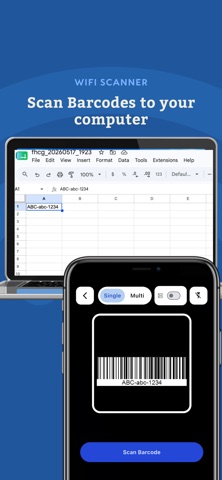
Turn Your Phone Into a Professional Warehouse Scanner Manage inventory, fulfill orders, scan barcodes, and synchronize stock across multiple sales channels — all from your iPhone. WiScanner is built for warehouses, retailers, logistics teams, and e-commerce businesses that want to replace expensive barcode scanners with a fast, reliable mobile solution. No additional hardware required. Works With Connect your stores in minutes. • Shopify • WooCommerce • ikas • Etsy • LightFunnels Manage all your operations from a single mobile app. Order Fulfillment Speed up your picking and packing process. • Pick orders faster • Verify products with barcode scanning • Reduce shipping mistakes • Update fulfillment instantly Perfect for warehouse teams handling daily orders. Inventory Management Keep inventory synchronized across every connected store. • Scan products to update stock • Perform inventory counts • Track stock movements • Synchronize inventory automatically When an order is completed, WiScanner can automatically update stock across your connected sales channels, helping prevent overselling. Product Management Manage your product catalog directly from your phone. • Create products • Update products • Edit barcode, SKU, price and quantity • Manage inventory without a desktop Barcode Scanning Modes Choose the workflow that fits your business. • Single Scan • Continuous Scan • Scan with Quantity • Inventory Count • Goods Receipt • Stock Verification • Replenishment Designed for real warehouse operations. Desktop Connector Turn your phone into a wireless barcode scanner for your computer. Scanned barcodes can be sent instantly to: • Excel • ERP Software • WMS Systems • Inventory Software • Web Applications • Any application that accepts keyboard input No complicated integrations required. Google Sheets Real-Time Scanning Scan barcodes directly into Google Sheets in real time. • Connect your Google account • Select or create a Google Sheet • Scan barcodes directly from your iPhone • Send scanned data to Google Sheets automatically • Keep your spreadsheet updated while scanning Perfect for inventory counts, stock tracking, asset management, order processing, and warehouse operations that use Google Sheets. No manual data entry or CSV import required. Offline Mode Keep working even without an internet connection. • Save scans locally • Continue scanning offline • Export data later Automation Integrate WiScanner into your existing workflows. • Webhooks • REST APIs • Internal Systems • Databases • Automation Platforms Export Export your scan history whenever you need. Supported formats: • CSV • Excel (Google Drive) Additional Features • Multi-store inventory synchronization • Marketplace order fulfillment • OCR text recognition • Barcode verification • Inventory counting • Warehouse workflows • CSV Export • Google Drive Export • Fast barcode scanning Perfect For • Warehouse Management • Inventory Management • Order Picking • Order Fulfillment • E-commerce Businesses • Shopify Sellers • WooCommerce Stores • ikas Merchants • ETSY Stores • LightFunnels Stores • Retail Stores • Logistics Companies • Asset Tracking • Stock Counting Replace expensive barcode scanners with your iPhone. Manage inventory, fulfill orders, synchronize stock, and streamline warehouse operations with WiScanner. Apple Privacy Policy (EULA) https://www.apple.com/legal/internet-services/itunes/dev/stdeula/ Privacy Policy https://www.wiscanner.com/en/privacy-policy.html Terms of Service https://www.wiscanner.com/en/terms-condition.html.
Screenshots