Moon Finder: Moonrise Widget
John Feiler

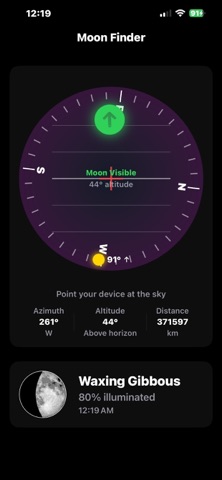
Moon Finder turns your iPhone into a personal lunar observatory. Using your device's compass and motion sensors, it guides you to the moon's exact position in the sky — just point your phone and follow the arrow. INTERACTIVE MOON FINDER Hold up your phone and Moon Finder shows you exactly where to look. A live compass ring rotates with your device while a green arrow points toward the moon's current position. Tilt your phone up or down and a level indicator shows the moon's altitude. When you're pointing right at it, the display lights up green — you've found it. DETAILED MOON DATA See everything about the moon at a glance: - Current phase with visual representation - Illumination percentage - Altitude and azimuth (compass bearing) - Moonrise and moonset times - Distance from Earth in kilometers - Ecliptic coordinates for orbital position - Whether the moon is above or below your horizon LOCKSCREEN & HOME SCREEN WIDGETS Keep the moon at your fingertips without opening the app: - Circular lockscreen widget showing phase, altitude, and azimuth - Rectangular lockscreen widget with phase image, illumination, and moonrise/set times - Inline lockscreen widget for a quick status line - Small and medium home screen widgets with phase, position, and moonrise/set times SUNRISE & SUNSET WIDGET — WORKS OFFLINE Sunrise, sunset, first and last light, solar noon and day length, calculated right on your iPhone. No internet connection needed, so it keeps working in the backcountry where other sunrise widgets go blank. - Lockscreen widgets: next sunrise or sunset, first and last light, and day length - Small and medium home screen widgets with a day arc showing where the sun is now - Uses your current location, even offline (GPS needs no signal) PRECISION ASTRONOMY Moon Finder uses the full Meeus algorithm with 120 periodic terms to calculate the moon's position, and the NOAA solar algorithm for the sun. The engine performs a full coordinate transformation — from orbital mechanics through ecliptic and equatorial frames to your local horizon — delivering accuracy within ±0.3° of the moon's position and about a minute for sunrise and sunset. All calculations happen on your device using your GPS location. No internet connection required.
Screenshots