Cutling - Clipboard Keyboard
Kenneth Fang

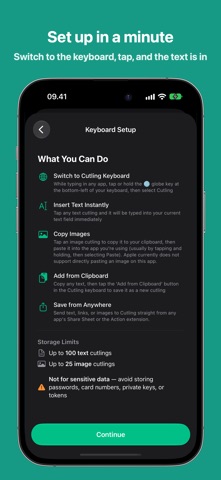
Cutling puts your most-used text one tap away. Add a lightweight keyboard extension and instantly insert saved snippets — addresses, bank details, email signatures, IDs, or anything you type repeatedly — without leaving the app you're in. How it works Open Cutling. Create your snippets. Enable the keyboard. That's it. When you need to fill in your address or share account details, switch to the Cutling keyboard and tap the snippet. Done. Why Cutling? No account required. No ads. No tracking. Just a fast, private utility that saves you from retyping the same things over and over. — Save addresses, bank info, IDs, bios, and more — Paste from any app via the keyboard extension — Sync across all your devices with iCloud — Set expiration dates to auto-remove temporary snippets — Color-label and customize each snippet with an icon
Screenshots