Strobe: Speed Reading
Jaafar Abdeen

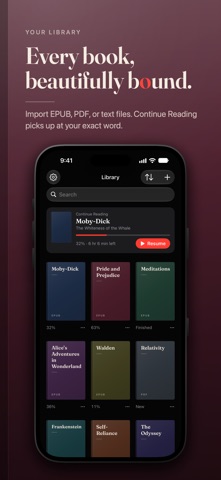
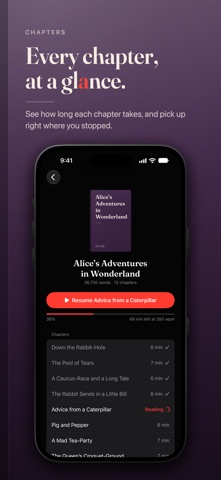
Speed read your own books and documents, one word at a time. No ads, no subscription, no account. Strobe is a speed reading app for iPhone, iPad, and Mac. It uses Rapid Serial Visual Presentation (RSVP): each word appears in the same spot on screen, so your eyes stay still instead of scanning across lines. Import a PDF, EPUB, plain-text, or Markdown file, or paste an article, then read at 100 to 1,000 words per minute. HOLD TO READ • Press and hold to read. Let go to pause. • Slide up or down while you read to change speed without losing your place. • Swipe sideways while paused to step word by word. • Prefer hands-free? Switch to tap to play. TIMING THAT FOLLOWS THE TEXT • Smart Timing keeps longer words on screen a little longer. • Punctuation Pauses slow down at sentence ends, commas, dashes, ellipses, and closing quotes, and you set the length of each. • Complexity Timing speeds up common words and slows down rare ones. • Acronyms and hyphenated words get extra time automatically. • Blank After Sentences adds an optional moment of empty screen between sentences. A FIXED POINT FOR YOUR EYES • Each word lines up on a red focus letter, its Optimal Recognition Point (ORP). • Show the previous and next words faintly on either side. • An open quote or parenthesis stays faintly above the word until it closes. YOUR LIBRARY • Every document gets a cover, and Continue Reading takes you back to your exact word. • EPUB tables of contents and PDF bookmarks become chapters, each with its reading time at your speed. • Open the full text with your place highlighted, search for any word or phrase, and tap a word to resume from there. • Page numbers, running headers, and footers are removed on import. • Chinese, Japanese, and Korean text is split into words, and Arabic keeps its connected letterforms. MAKE IT YOURS • Seven fonts, adjustable text size, and four text colors. • A true black background for OLED screens and reading in the dark. • Every document remembers its own speed. • Keyboard shortcuts on Mac and iPad: Space to read, arrow keys to step, ⌘N for new text, ⌘O to import. • Works with VoiceOver, Larger Text, and Reduced Motion. PRIVATE BY DESIGN Your documents and reading progress stay on your device. Strobe needs no account and has no ads, analytics, or tracking. FREE AND OPEN SOURCE Strobe is free, with no subscription or in-app purchases. The source code is public on GitHub under the Apache 2.0 license. Strobe can't import DRM-protected EPUBs or password-protected PDFs.
Screenshots