Baby Dashboard
Sairo Studio

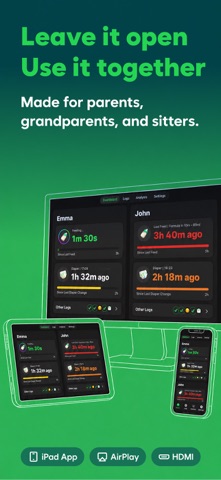
Parenting is a team sport. So is keeping records. Mom, dad, grandparents, relatives, babysitters— everyone involved in care needs to see the same information, at the same time. But realistically, can you ask everyone to install an app, sign up, configure it, and learn how to use it? For most families, that simply doesn’t scale. ▶ One dashboard is enough. A baseball stadium may have tens of thousands of spectators, but it only needs one scoreboard. Baby Dashboard works the same way. No matter how many caregivers are involved, a single shared dashboard lets everyone see what’s going on—and log new events instantly. Turn that unused iPad into a living-room dashboard. Connect an old iPhone to a TV and make it your family’s shared screen. Soon, you’ll start to understand why your baby is crying— sometimes even before the crying starts. ▶ Designed around grandparents. Baby Dashboard is built starting from the people who are least comfortable with digital devices— so it ends up being easy for everyone. Large, clear visuals. No clutter. No hidden complexity. We tested this with real grandparents: - Could they glance at the dashboard from across the room while feeding the baby on the couch? - Could they use the app without instructions the first time they saw it? Baby Dashboard exists because those questions mattered. ▶ No accounts. Yes, sync. Sometimes one screen isn’t enough. Night feeds happen in the bedroom. Diaper changes may happen outside. Baby Dashboard supports multiple devices reading and writing the same data—without accounts, passwords, or setup flows. Generate an invite code on one device. Enter it on another. That’s it. No sign-ups. No forms. No friction. ▶ Built by parents of twins. All parenting is hard. Raising multiples is a different level entirely. We built Baby Dashboard because we needed it ourselves. We added the features we relied on every day—and removed the ones we never touched. The app is designed not just for twins, but for triplets and beyond, with all babies visible on a single screen at all times. ▶ Siri & Shortcuts, first-class. Baby Dashboard is used in moments when your hands are usually full. That’s why voice control isn’t an add-on—it’s the foundation. Every core action is designed to work through Siri and Shortcuts. Voice came first. Screens came second. Try saying: “Start feeding in Baby Dashboard” “Log diaper change in Baby Dashboard” Or create your own Shortcuts with natural phrases like: “Start feeding John” “Emma diaper” ▶ Your data is yours. Every record in Baby Dashboard can be exported as a CSV file, at any time. Archive it whenever you want. Analyze it however you want. Move it anywhere you want. You can also import existing records, as long as they follow the same format. Baby Dashboard never locks your data in. You can leave anytime—and come back anytime. If you experience any issues or have suggestions, feel free to reach us at sairostudio@proton.me
Screenshots