LiveTranslate: Translator
Newkline Co., Ltd.

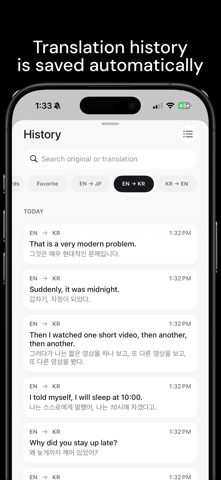
Speak across languages and keep the words that matter. LiveTranslate shows your speech and its translation together as you talk. Choose two languages, tap either microphone to switch direction, and play the translation aloud. Use saved history to revisit a conversation, find a phrase, or keep a favorite for next time. Key features - Real-time voice transcription and translation - Two microphone buttons for both language directions - Play translated speech aloud - Saved history with search, language filters, favorites, editing, deletion, and select all/deselect all - Adjustable font sizes for original and translated text - Monthly recording usage tracking with Premium unlimited access Free users can record up to 120 minutes each month. Unused time does not carry over. Premium unlocks unlimited recording while the subscription is active. Available languages depend on Apple speech recognition and translation support. Some languages require a speech or translation model download before use. ■ PREMIUM subscription Payment will be charged to your Apple ID at confirmation of purchase. The subscription renews automatically unless canceled at least 24 hours before the end of the current period. Renewal is charged within 24 hours before the end of the current period. You can manage or cancel your subscription in your App Store account settings. Subscription options: Monthly and yearly subscriptions are available. Check the purchase screen for current prices and terms. A free trial may be available to eligible users under the terms shown by the App Store. Privacy Policy: https://newkline.com/apps/avrx/privacy_en.html Terms of Use (EULA): https://www.apple.com/legal/internet-services/itunes/dev/stdeula/
Screenshots