IFR Simulator
Gizem Celik

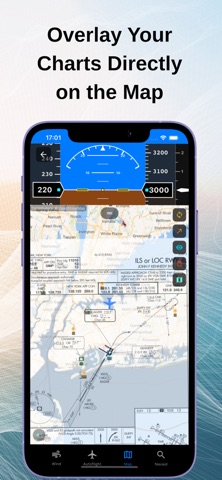
IFR Simulator is an educational flight training app designed to help you practice core instrument procedures using realistic, instrument-style displays, with worldwide airspace available for training and procedural practice. Use the simulator to build confidence with IFR fundamentals such as tracking, intercepts, holds, and wind correction—anytime, anywhere. KEY FEATURES • Realistic instrument displays: - PFD (attitude, airspeed, altitude, heading, vertical speed) - ND-style navigation display with course/deviation and navigation indications - Custom Map Overlays: Import your own PDF or image approach plates and place them directly onto the moving map. - Updated NAVaids - Autopilot • ILS/VOR/ADF navigation training: - Select a VOR, tune/identify, set course (OBS), intercept and track radials - TO/FROM indications and CDI behavior • Custom Map Overlays: - Import your own PDF or image approach plates and place them directly onto the moving map. - Use our new two-point alignment tool to perfectly match your charts with real-world coordinates. • NDB navigation training: - ADF-style bearing tracking practice • DME Arc practice: - Learn arc intercepts and corrections with distance awareness • Holding patterns: - Standard and non-standard holds - Entry guidance/visualization (when enabled) - Show/hide holding patterns and procedures on the map • Map tools: - Moving map with selectable navaids - Flight track display (show/hide) and clear track - “Go Here” positioning for quick practice setups • Navaid management: - Search ILS/VOR/NDB by ID/name/country(Updated NAVaids) - Favorites - Create custom navaids (user-defined) and edit coordinates • Wind & performance: - Adjustable wind direction and speed - Groundspeed / track / drift information for training wind correction concepts - Groundtrack • Autopilot & controls: - Autopilot modes for guided practice - Dedicated knobs for CRS/HDG/IAS/ALT/VS - Flight Settings for quick airspeed/altitude adjustments IMPORTANT IFR Simulator is for training and educational purposes only. It is not intended for real-world navigation or flight operations. PRO SUBSCRIPTION (Optional) Upgrade to IFR Pro to unlock premium exercises and advanced scenarios. Holding Calculator is free and does not require subscription. Free Trial • Includes a free trial (duration varies by plan). • If you start a free trial, any unused portion of the trial will be forfeited when you purchase a subscription. Auto-Renewing Subscription Terms (Apple Required) • Payment will be charged to your Apple ID account at confirmation of purchase. • Subscriptions automatically renew unless auto-renew is turned off at least 24 hours before the end of the current period. • Your account will be charged for renewal within 24 hours prior to the end of the current period, at the cost of the selected plan. • You can manage and cancel your subscriptions by going to your App Store account settings after purchase. • Restore purchases is available in the app. Links Privacy Policy: https://gist.github.com/egitimtakipuygulamasi/b2d76e09599f3e31277d6c84ce4b47cd Terms of Use (EULA): https://www.apple.com/legal/internet-services/itunes/dev/stdeula/ Support ifrsimulator@outlook.com
Screenshots