Fire Message: Push Tester
PANTELEIMON STANIMEROS

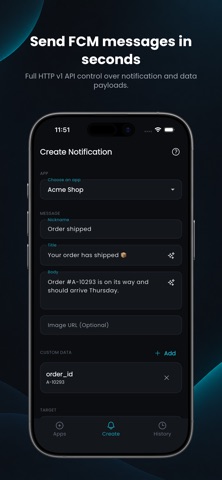
Fire Message lets you send and test Firebase Cloud Messaging (FCM) push notifications right from your phone. Built for mobile developers and QA teams: no terminal, no scripts, no laptop. MANAGE EVERY PROJECT Add as many Firebase projects as you need and switch between Dev, Staging, and Production instantly. Each project keeps its own credentials, so you always know where a message is going. SEND MESSAGES IN SECONDS Compose push notifications with full FCM HTTP v1 API control. Set the title, body, and image, add custom data key-value pairs, and shape the notification and data payloads exactly the way your app expects them. TARGET TOKENS, TOPICS, OR CONDITIONS Send to a single device token, broadcast to a topic, or combine topics with condition expressions. Test exactly the audience your production app will reach before you ship. TRACK EVERY SEND AND RESPONSE Every message is saved with its full payload and the server response. Review past sends, duplicate a payload to tweak it, and resend in one tap. YOUR KEYS NEVER LEAVE YOUR DEVICE Service account credentials are encrypted and stored only on your device. No sign-up, no middleman servers: messages go straight from your phone to the FCM API. BUILT FOR DEVELOPERS - Debug notification handling on real devices - Check foreground, background, and data-only behavior - Reproduce bug reports with the exact payload - Demo push features to clients and teammates anywhere Download Fire Message and send your next test notification in seconds. By using this app, you agree to the following: Privacy Policy: https://stanimeros.com/privacy-policy Apple’s Standard End User License Agreement (EULA): https://www.apple.com/legal/internet-services/itunes/dev/stdeula/
Screenshots