BlurQ: Face Blur Photo & Video
Anas Hafidi

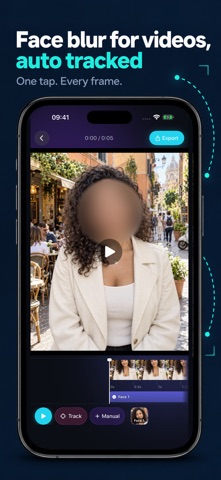
Blur faces in photos and videos in seconds, right on your iPhone. Using Apple's on-device Vision framework, BlurQ finds every face for you, so you can share pictures of kids, friends, crowds and strangers without exposing anyone. • Blur faces automatically, on device: every face is detected, and you choose which ones to hide • Blur faces in videos: one tap finds each face and follows it through the whole clip • Pixelate or mosaic anything by hand with a brush: freeform, oval or rectangle, with undo • Blur the background around people and keep the subject sharp • Hide license plates, addresses and text (Pro) • Blur up to 20 photos at once in batch mode (Pro; 2 at a time free) Private by design Faces are found and blurred on your device. Your photos and videos are not uploaded anywhere, and BlurQ strips location and camera metadata (EXIF) from the photos you export. Before you post Compare before and after with a slider, pick Gaussian blur or pixelate for free, and switch to mosaic with Pro. Free and Lifetime Pro Face blur, background blur, manual blur and pixelate are free. Free exports carry a small watermark and short video clips. Lifetime Pro is a one-time purchase: no watermark, full-resolution photos, full-length videos, mosaic, text and plate blur, batch of 20 and no ads. Pick a photo and blur your first face now. Terms of Use: https://www.blurq.app/terms Privacy Policy: https://www.blurq.app/privacy
Screenshots