Steve: Offline Music Player
Hamza RABI

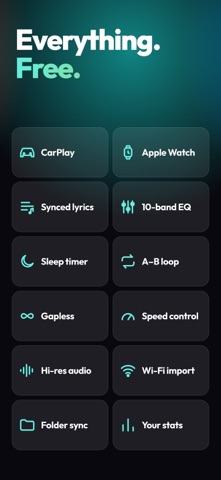
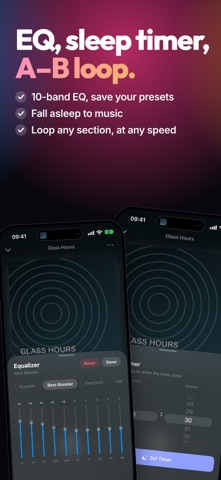
Steve is the free, offline music player for the music you own — with an Apple Watch app, CarPlay, and a shareable story of your listening. No ads, no subscriptions, no account. Just your music, played beautifully. Play every local file in full quality: FLAC, MP3, M4A/AAC, WAV, OGG Vorbis, Opus, AIFF, and ALAC — lossless and hi-res up to 24-bit/192kHz. No internet required. NEW IN THIS VERSION: • Listening Stats — an animated, shareable story of your top artists, tracks and albums • Monthly recap — a look back at your month, ready on the 1st • Online Info (optional) — find artist pictures, album covers, release years and countries. Off until you turn it on • Redesigned artist, album and playlist screens — bigger artwork, smoother scrolling, pull down to close • Clean Up Library — remove empty playlists in one tap 100% FREE & AD-FREE: • Completely free — every feature included, no premium tier • Optional tip jar if you'd like to support development • Zero ads — no banners, no interruptions • No subscription, no account — own it forever • Works fully offline ALL YOUR FORMATS: • FLAC — lossless CD-quality and hi-res • Opus — modern high-efficiency codec • ALAC — Apple Lossless • MP3, M4A / AAC, WAV, OGG Vorbis, AIFF • Hi-res support up to 24-bit/192kHz POWERFUL PLAYBACK: • Gapless playback for seamless albums and continuous mixes • Built-in equalizer with savable custom presets • A/B loop — set start and end points to repeat any section of a track • Sleep timer — stop playback automatically after a set time • Playback speed control for podcasts, audiobooks, and practice • Queue — view, reorder, and manage what plays next • Background playback, Lock Screen and Control Center controls SYNCED LYRICS: • Import LRC, TTML, DFXP, or plain-text lyrics — just name the file like its track (song.mp3 → song.lrc) • Line-synced lyrics scroll automatically as the song plays • Word-by-word, beat-by-beat highlighting from TTML for karaoke-style lyrics • Full-screen lyrics view CARPLAY: • Browse artists, albums, playlists, and favorites from your car • Now Playing controls and metadata stay in sync while you drive APPLE WATCH: • A dedicated remote on your wrist — play/pause, skip, favorite, and adjust volume with the Digital Crown • Browse playlists, favorites, and your full library, then start playback on your phone PRIVACY FIRST: • Your music files and listening history stay on your device • No sign-up, no login, no internet needed to play • Online Info is optional: when you turn it on, only artist and album names are sent to look up pictures and covers LISTENING STATS: • Your top artists, tracks and albums, all-time or month by month • See when you listen and get a listening persona, from Early Bird to Night Owl • Lossless share, top decade, and your artists' countries • Share any page as a story-sized image YOUR LIBRARY, YOUR WAY: • WiFi import — send tracks wirelessly from a Mac or PC on the same network • Import from the Files app and cloud services • Edit track and album metadata — title, artist, and artwork • Find and remove duplicate tracks • Create and manage playlists, and mark favorites for quick access • Instant search; sort by title, artist, album, or date added DESIGNED FOR YOU: • Clean, modern interface with a handy mini player • Customizable Home and Now Playing layouts • Dark and Light mode — follows your system settings • Optimized for iPhone and iPad, with full VoiceOver accessibility • Localized in 17 languages WHY STEVE? Unlike streaming services, Steve gives you complete control. No monthly fees, no internet dependency, no ads. Perfect for: - Music collectors with large local libraries - Audiophiles who want lossless FLAC and hi-res playback - People who value privacy and want their library kept on their own device - Listeners in areas with limited or no internet Download Steve — the free, private, ad-free way to enjoy the music you own.
Screenshots