Noter AI Meeting Notes Summary
Yousef Zuriqi

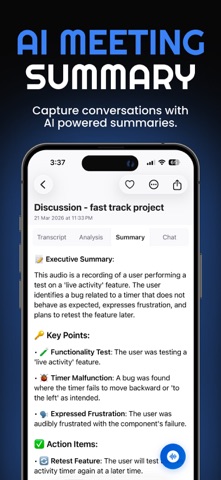
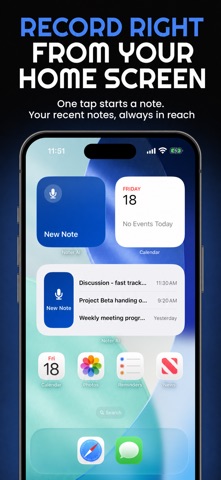
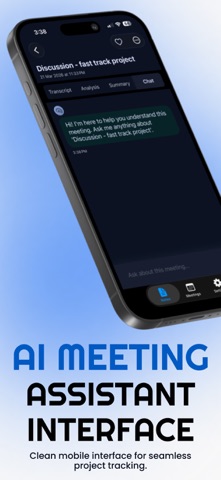
Noter AI records your meetings in person or online, transcribes them in 60+ languages, and turns them into a summary, action items, and notes you can chat with. It works for real conversations: people talking around a table, lectures, interviews, and calls where people switch between two languages. Language detection is always on, so a meeting that moves between Arabic and English, Hindi and English, or Spanish and English comes back as one transcript. HOW IT WORKS • Tap record on your iPhone or iPad, import an audio file, or send the Noter AI bot to your online meeting. • Within minutes you get a full transcript with speaker labels, an executive summary, detailed analysis, and action items. • Ask questions about one note or across all your notes, then export to PDF or Word. RECORD IN PERSON • One-tap recording for meetings, lectures, interviews, and client visits. No bot and no laptop needed. • Recording continues in the background while you use other apps. • Start faster from the Control Center widget or with Siri Shortcuts. MEETING BOT FOR ONLINE CALLS • Send the bot to Zoom, Microsoft Teams, Google Meet, or Webex. • Connect Google Calendar or Outlook and send the bot with one tap. • Follow the bot's status on the Dynamic Island and Lock Screen. TRANSCRIPTION IN 60+ LANGUAGES • Speaker detection and timestamps. • Mixed-language conversations stay in one transcript. • Tap any sentence to jump to that moment in the audio. SUMMARIES, ACTION ITEMS, AND AI CHAT • Executive summary, key decisions, and action items with owners. • Get the summary in the spoken language or in one of 12 languages, including English, Arabic, Spanish, French, German, and Hindi. • AI-generated titles, so you never have to name a note. TRANSLATION • Translate any transcript into 46 languages. • Speaker labels and timestamps stay in place. IMPORT, EXPORT, AND SHARE • Import M4A, MP3, WAV, and more from Files, or send audio from any app with the Share Extension. • Export as PDF, Word (.docx), or plain text, or copy with formatting. ORGANIZE • Favorites, tags, and full-text search across every note. • Cloud sync across your devices. WHO USES NOTER AI • Managers and teams: meeting minutes and action items without typing. • Students: record lectures and get study notes. • Journalists and researchers: record and transcribe interviews. • Sales and consultants: client meetings summarized and ready to share. • Multilingual teams: one transcript for meetings held in two languages. PLANS • Start free with short recordings, or try every feature with a free trial. • One flat subscription per person. No per-seat pricing. • Monthly and yearly plans. Future features included. Official website: https://www.noterai.net Privacy Policy: https://www.noterai.net/privacy Terms of Use: https://www.apple.com/legal/internet-services/itunes/dev/stdeula/
Screenshots