Virtual Mic: Bluetooth Mic
nz-sw

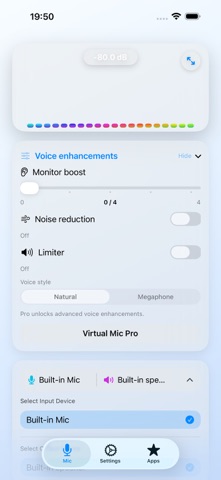
Use your iPhone or iPad as a live microphone. Speak into its mic and hear your voice through a compatible speaker or headphones. Virtual Mic makes it easy to start monitoring, check your level, and choose available audio routes. Wired, Bluetooth, and USB devices can be used when supported by iOS and your device. What you can do • Start and stop live microphone monitoring with one tap • See a real-time level meter and audio visualizer • Adjust monitor boost and choose Natural or Megaphone voice style • Use Noise Reduction and Limiter with Pro or a rewarded unlock • Follow optional live transcription on screen • See the current input and output route Useful for announcements, rehearsals, speaking practice, and checking a microphone or speaker. Start with a low output volume and keep the mic away from speakers to reduce feedback. Bluetooth delay varies by device and route. Pro unlocks advanced controls and removes ads. Free users can temporarily unlock supported advanced controls by watching a rewarded ad. Terms of Use: https://www.apple.com/legal/internet-services/itunes/dev/stdeula/
Screenshots