MintFlow: VPN & HTTPS Capture
GalaxNet Ltd.

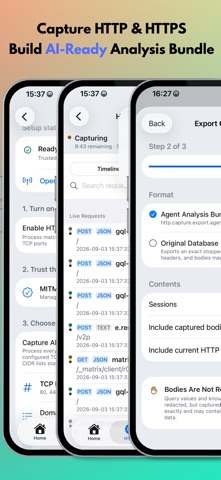
Connect to your own VPN or proxy, block ad and tracker domains, and inspect or rewrite web traffic. MintFlow brings VPN connections, flexible routing, DNS filtering, and HTTP/HTTPS debugging together on iPhone and iPad. Use Simple Mode to send traffic through one Direct, VPN, or proxy output, or build detailed routing rules. See where connections go, investigate DNS queries, and capture the requests and responses you need. VPN AND PROXY - WireGuard VPN with file and QR code import - HTTP and SOCKS5 proxies - Pro support for AmneziaWG, Shadowsocks, Shadowsocks 2022, VMess, AnyTLS, VLESS with REALITY and Vision, Trojan, and experimental Tailscale - Trojan over TCP or WebSocket with TLS - Import supported VLESS, Trojan, VMess, AnyTLS, and Shadowsocks share links by pasting a link, scanning a QR code, or choosing a QR image - Route proxy traffic through VPN connections BUILT-IN DNS AD BLOCKING - Free, opt-in filtering of ad and tracker domains inside MintFlow - Choose AdGuard DNS filter, HaGeZi Multi Normal, or OISD Small - Bundled lists let you get started without an initial filter download - Automatic filter-list updates and manual refresh - Keep your preferred DNS servers; no HTTPS decryption certificate required for DNS filtering - Check domains against a filter and inspect blocking decisions in DNS Log FLEXIBLE ROUTING AND DNS - Match networks, domain sets, and domain keywords - Choose Direct, VPN, proxy, reject, or drop actions - Device-wide DNS with Direct DNS, DoT, and DoH - Static DNS records with Pro - Live settings with guidance when a VPN restart is required HTTPS CAPTURE AND WEB REWRITE - Inspect HTTP/HTTPS requests, responses, headers, and bodies using MITM decryption - Capture all supported traffic or select domains, IP addresses, and TCP ports - Search capture history and preview JSON, JavaScript, CSS, HTML, images, and more - Rewrite URLs or response bodies with jq and JavaScript - Explore HTTP API Research, Request Simulator, and Rewrite Lab - Export AI-friendly analysis bundles and exchange portable .mfhrb rewrite bundles NETWORK VISIBILITY AND TOOLS - DNS Log with a timeline, quick domain actions, and filtering by matched rule type - Flow Capture with destination, protocol, transfer, duration, and route details - Pro packet capture with PCAPNG export - Ping, Traceroute, DNS Test, VPN & Proxy Test, and profile diagnostics - Pro iPerf3 performance tests and On-Demand VPN rules - Siri Shortcuts integration PORTABLE PROFILES Edit, validate, import, and export readable text profiles. Review compilation notices to understand the effective configuration. Pro adds multiple profiles and iCloud sync for profiles and local rewrite scripts. Save a preferred Tailscale exit node in your profile, with separate controls for live device settings. FREE AND PRO Free includes WireGuard, HTTP and SOCKS5 proxies, DNS ad blocking, Simple Mode, App Routing, DoH/DoT, DNS Log, Flow Capture, HTTP inspection, Capture All, and an allowance for domain sets and HTTP rewrite rules. Pro unlocks advanced protocols and tools, expanded profile resources, iCloud sync, packet capture, and automation. IMPORTANT 1. MintFlow does not provide VPN or proxy services. Configure your own server or a compatible third-party service. 2. DNS filtering blocks matching domains; it cannot remove every ad or filter individual page elements. 3. HTTPS inspection requires installing and trusting the MintFlow CA certificate. Certificate pinning and some protocols may prevent capture. 4. WireGuard® is a registered trademark of Jason A. Donenfeld. Manual: https://galaxnet.dev/mintflow/manual Privacy Policy: https://galaxnet.dev/mintflow/legal/privacy/ Terms of Service: https://galaxnet.dev/mintflow/legal/tos/
Screenshots