Tractor GPS Field Navigator
Abdelkarime Achtaou

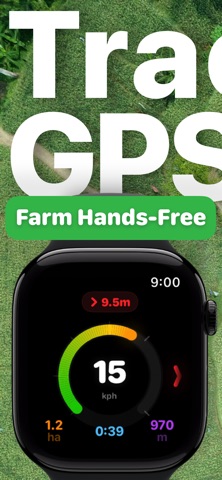
Turn your iPhone into a powerful tractor GPS guidance system. FieldMate helps farmers drive straight, measure fields, and track every pass, no expensive hardware needed. DRIVE STRAIGHT, EVERY PASS - Set your A+ point and start driving. FieldMate auto-detects your heading and generates parallel guidance lines across your entire field - Real-time lightbar indicator shows exactly how far off-line you are - Haptic feedback alerts you when drifting off course - Works for spraying, plowing, seeding, and harvesting: switch operations with one tap MEASURE ANY FIELD, NO DRIVING - Drop pins on the field's corners and get its area in acres or hectares instantly - See the perimeter and corner count as you go - Drag any pin to fine-tune, and the field fills in as a closed shape - Save measured fields right alongside your tracked jobs 3D TRACTOR ON YOUR MAP - See a detailed 3D tractor model on the satellite map instead of a boring arrow - Front wheels steer in real time based on your heading changes - Toggle between 3D tractor and simple icon in settings APPLE WATCH COMPANION - Speed gauge with smooth gradient ring right on your wrist - Haptic guidance: feel which way to steer without looking at any screen - Area covered, distance driven, and session timer at a glance - Matches your unit preferences (metric or imperial) FIELD TRACKING - Track your path in real time on a satellite map - See covered area in acres or hectares as you drive - Monitor speed, distance, and elapsed time - Adjustable implement width from 1 to 30 meters SAVE, REVIEW, AND EXPORT - Every tracked job and measured field is saved to your history - Reopen any session to see its path or outline on the map - Export track data as a GPX file to share or use in other farm software - Pro: back up your fields and sync them across your devices with iCloud HOME SCREEN WIDGET - Glance at your total area logged, job and field counts, and your latest field, right from the Home Screen BUILT FOR THE FIELD - Big, glove-friendly buttons: START/STOP, zoom, guidance controls - Landscape mode optimized for phone mounts - Metric or Imperial units, switch in settings - Satellite, standard, or hybrid map views - Live Activity on Lock Screen shows speed, heading, and area - Screen stays on while tracking, no accidental locks CUSTOMIZABLE - Choose guidance line color (red, blue, yellow, white, orange, cyan) - Adjust line opacity or hide them completely - 3D tractor with steering or simple location arrow, your choice No subscription needed to try. Start your free trial and see the difference. Questions or feedback? We'd love to hear from you. Terms of Use (EULA): https://www.apple.com/legal/internet-services/itunes/dev/stdeula/
Screenshots