WordReader: News & Blog Reader
Ulas Sancak

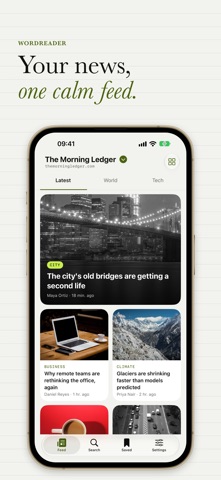
WordReader brings the WordPress news sites and blogs you trust into one calm, clean feed. No more jumping between tabs and bookmarks: pick your sources once, then read. FOLLOW SOURCES YOU TRUST • Browse news sites and blogs by country and follow them with one tap. • Switch between sources from the top of your feed in a second. • Add any WordPress site by pasting its address (with Pro). READ WITHOUT THE NOISE • Latest stories as a big headline card and a tidy two-column grid. • Jump into categories like politics, tech, sports or culture with tabs. • Clean article pages with reading time, in light or dark mode. • Text follows your system size settings. FIND AND KEEP WHAT MATTERS • Search every post of a source. • Save articles to read later; your saved list syncs to your account. • Share a story or open it in the browser when you need to. YOUR ACCOUNT, YOUR WAY • Sign in with Apple, Google or email, or start without an account. • Optional notifications for new stories. WORDREADER PRO WordReader is free to use with ads. Pro removes ads and raises your limits: follow more sources, add your own WordPress sites and save more articles. Choose monthly or yearly; the yearly plan can start with a free trial where available. Payment is charged to your account at confirmation of purchase. Subscriptions renew automatically unless cancelled at least 24 hours before the end of the current period. Manage or cancel in your account settings after purchase. WordReader is an independent reader. Articles belong to their publishers and open from their own sites. Terms of Use (EULA): https://www.apple.com/legal/internet-services/itunes/dev/stdeula/ Privacy Policy: https://wordreader.roxyapps.net/pages/privacy_en.html
Screenshots