B-KEY Pro for Tesla · Car Key
钰钢 王

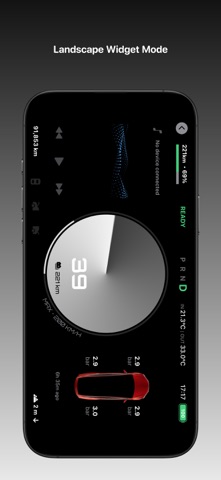
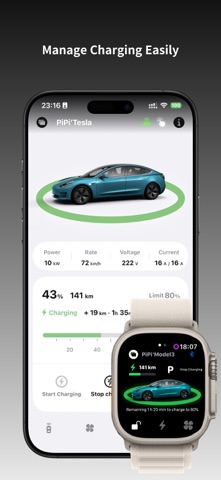
B-KEY Pro is more than a Tesla Bluetooth key — it is a complete vehicle control and dashboard experience for iPhone and Apple Watch. Features include: • Bluetooth vehicle control • Remote vehicle control • Apple Watch standalone support • Landscape dashboard mode Turn your iPhone into a customizable vehicle dashboard with multiple speedometer styles and rich information widgets. 【Apple Watch Support】 • Standalone support • Vehicle & climate controls • Charging status & temperature adjustment • Complications, Smart Stack & Siri Shortcuts support 【Vehicle Controls】 • Vehicle status display • Lock / unlock • Door, trunk & charge port controls • Sentry Mode, horn & flash controls 【Climate Controls】 • Climate start / stop • Temperature adjustment • Vent / defrost • Advanced Tesla climate features support 【Charging Management】 • Charging status & details • Charging limit adjustment • Start / stop & scheduled charging 【Landscape Dashboard Mode】 Transform your iPhone into a customizable vehicle dashboard with: • Multiple speedometer styles • Vehicle information widgets • Weather, navigation, media & telemetry modules • Freely customizable layouts 【Widgets】 • Home & Lock Screen widgets • Custom quick controls • Control Center shortcuts 【Live Activities & Dynamic Island】(Bluetooth mode only) • Charging Live Activities • Dynamic Island vehicle status • Lock Screen quick controls 【Siri Shortcuts】 • Single and combined custom shortcuts support 【Supported Vehicles】 • Model 3 • Model Y • 2021+ Model S / Model X Requires Tesla software version 2023.44 or later. 【Security & Privacy】 B-KEY Pro is officially certified with Tesla developer APIs. After signing in with your Tesla account, remote vehicle control and vehicle status features become available. B-KEY Pro does not collect or upload any account information. 【Subscription】 Subscriptions unlock all features on both iPhone and Apple Watch, including Bluetooth Mode and Remote Mode. Subscription options:、Monthly Subscription、6-Month Subscription、Annual Subscription、Lifetime Purchase Payment will be charged to your iTunes account after purchase confirmation. Subscriptions automatically renew unless canceled at least 24 hours before the end of the current period. Terms of Service: https://app4tsl.com/bkeypro/protocol_s.html Privacy Policy: https://app4tsl.com/bkeypro/index_s.html#privacy 【Q&A】 1. Do I need a Tesla account? B-KEY Pro supports both Bluetooth Mode and Tesla Remote Authorization. If you only use Bluetooth vehicle control nearby, a Tesla account is not required. Remote control features require Tesla account authorization. 2. Can Apple Watch work independently? Yes.After subscribing, keep your iPhone connected to Apple Watch and reopen B-KEY Pro on Apple Watch to sync automatically. 3. Are iPhone and Apple Watch keys shared? No.Apple Watch and iPhone are paired and managed independently. Vehicle images and colors can sync automatically. 4. Does it support passive entry and auto lock? iPhone supports: • Passive entry • Passive drive authentication • Walk-away auto lock After rebooting the iPhone, you may need to reopen the app once. Due to watchOS background limitations, Apple Watch may not always support passive features reliably. 5. Why is the speed different from the Tesla screen? B-KEY Pro transfers data over Bluetooth. Because of Bluetooth transmission characteristics and vehicle environment interference, slight differences may occur. 6. What if the Bluetooth module was replaced? If your Tesla Bluetooth module was replaced, you may need to reset the Bluetooth ID in: B-KEY Pro → Vehicle Settings → Reset Bluetooth ID 7. How do I remove a Bluetooth key? Open B-KEY Pro → Vehicle Settings → Remove Key. After removal in the app, also delete the corresponding Bluetooth key from Tesla’s in-car key management screen. 【Support】 Email: bkeyfeedback@gmail.com We welcome your feedback on the App Store.
Screenshots