Video Looper - for Safari
Nick Dubov

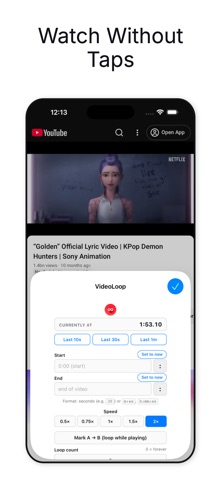
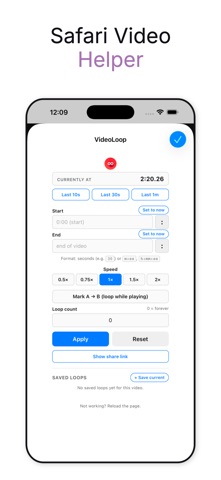
Loop any moment of any video on the web - right inside Safari. VideoLoop turns Safari into a video looper. Replay a chorus, repeat a dance step, drill a sentence in a language you're learning, or just keep a video playing forever. It works on YouTube, Vimeo, X, TikTok web, and pretty much any site that plays HTML5 video. HOW IT WORKS 1. Enable VideoLoop in Safari Settings > Extensions > All Websites > Allow. 2. Open any video. 3. Tap the toolbar icon, set a Start and End time, or hit "Mark A to B" while it plays. EVERYTHING YOU CAN DO - Loop the whole video automatically - no more tapping replay. - Loop a custom range. Type a time or tap "Set to now" to grab the current playback position. - A to B repeat. One tap to mark A while the video plays, second tap to mark B. Loop starts immediately. - Playback speed: 0.5x, 0.75x, 1x, 1.5x, 2x. Perfect for music, dance, and language practice. - Quick loops: last 10 seconds, 30 seconds, or 1 minute - one tap. - Save named loops per video. Long-press a saved loop to rename. - iCloud sync. Saved loops follow you across iPhone, iPad, and Mac. - Loop count limiter. Loop 5 times, 10 times, until you say stop. - Shareable loop links. Send a friend the exact moment, with the loop pre-set. - Per-video memory. Your loop and speed are restored next time you visit. - Reliable on YouTube - no more auto-advance, no more page freezes. PERFECT FOR • Musicians learning a song • Dancers drilling choreography • Language learners repeating phrases • Athletes reviewing a clip • Coaches breaking down technique • Parents who just need that one video to keep playing Free. No subscriptions, no in-app purchases, no ads. Privacy: VideoLoop runs locally inside Safari. It does not track you, doesn't have an account, and doesn't send your browsing history anywhere.
Screenshots