Due - Reminders & Timers
Due Apps LLP

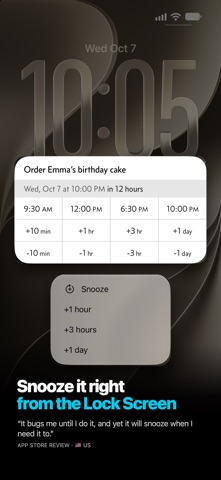
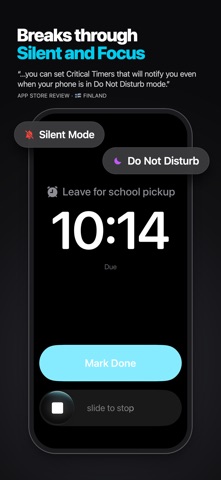
Due remembers all the things that you need so you don't have to. It reminds you again and again until you act, so it’s impossible to forget anything. And it's lightning-fast to set and postpone reminders, all thanks to a clever time picker and natural date parsing. KEY FEATURES 1. Persistent & Effective Auto Snooze* keeps nudging you about a missed reminder until you mark it done or reschedule it. Choose between every 1, 5, 10, 15, 30 and 60 minutes. 2. Impossible to Miss Some reminders can't wait. Use Critical Alerts to get through silent mode and Focus. Or use Prominent Alerts†, which ring like an alarm until you act. 3. Fast to Set, Fast to Postpone Keep the times you use most a tap away. Twelve Quick Access Times—all fully customizable—make setting or postponing reminders a piece of cake. 4. Just Type or Say It Type or say “Dentist 3p Thu” or “Meeting in 1h 20m”. Due spots the date, and one tap sets it. 5. Powerful Recurring Reminders From simple daily reminders to the every-3rd-Wednesday-of-the-month kind, Due keeps up with your routine. 6. Countdown Timers Not every reminder happens at a time of day. Some happen when the laundry cycle is done. That's what timers are for: precise to the second, with Auto Snooze too. Or just say “Hey Siri, start Laundry timer in Due”. 7. On Your Apple Watch Wear an Apple Watch? Due comes with you. Mark reminders done, snooze them, add new ones, start and stop timers—all from your wrist. It's a companion to Due on iPhone, so keep your iPhone nearby. 8. Widgets, Control Center & Shortcuts See what's coming up on your Home Screen and Lock Screen. Start timers and add reminders from Control Center, and automate the rest with Shortcuts. 9. Everywhere You Are Your reminders and timers on your iPhone, iPad, Apple Watch and Mac‡, all kept in sync with iCloud or Dropbox. 10. No Account, Completely Private There's no account to sign up for. We don't store, and we can't access, your reminders and timers. And you don't need internet to receive reminders. 11. Accessible to Everyone Due follows the text size you set on your device, on every screen, and offers full VoiceOver support. It's also localized in 17 languages. * By default, auto snooze repeats 5 times, and can be configured to repeat up to 10 times. Due can auto snooze any overdue items indefinitely when you launch Due or act on any of its notifications. † Prominent Alerts require iOS 26 or later. ‡ Sync on Mac requires Due for Mac (sold separately). WHAT'S THAT IN-APP PURCHASE ABOUT? When you purchase Due today, you will have access to every feature in the app today—no further purchase required. You will also get every new feature released within a year of your purchase. The optional Due Upgrade Pass subscription gives you access to new features released after that first year. And here's the deal: Every feature that you have unlocked will remain available to you, forever—even if you stop subscribing. Even without a subscription, you'll always receive bug-fix and compatibility updates for free. These updates add support for the latest iPhones, iPads and Apple Watches, and keep Due working well on the latest versions of iOS, iPadOS and watchOS. Due has a pretty good track record with that. To illustrate: If you bought Due back in 2010 for your iPhone 3G running iOS 4, that very same app in 2026 is now optimized for iPhone 18 Pro Max running iOS 27. It even works on devices that didn't exist back then, such as the iPad Pro and the Apple Watch. TERMS & PRIVACY POLICY Our terms of use and privacy policy are available here: https://www.dueapp.com/terms.html COMPATIBILITY Due requires an iPhone or iPad running iOS 18 or later. The Apple Watch app requires watchOS 10 or later, and your paired iPhone nearby.
Screenshots