Quick Start - Data Transfer
凡 刘

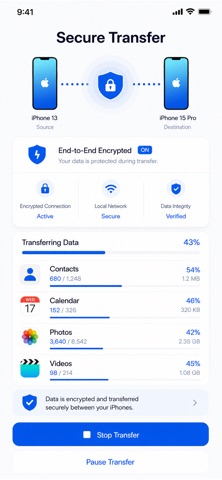
Quick Start - Data Transfer Move your photos, videos, contacts, and calendars to a new device in a simple and guided way. Quick Start is designed to help you transfer important personal data when switching to a new phone or tablet. Connect your devices, choose the content you want to move, and start transferring with a clean, lightweight experience. Quick Start currently supports transferring: • Photos • Videos • Contacts • Calendars The app focuses on making device migration easier, clearer, and more private. Whether you are setting up a new device or moving important memories and personal information, Quick Start helps you transfer supported data without cables. Key Features Photo Transfer Move photos from one device to another quickly and easily. Video Transfer Send videos wirelessly between devices. Contacts Transfer Transfer your contacts to your new device. Calendar Transfer Move calendar events so your schedule stays with you. Wireless Transfer Connect devices and transfer supported content without cables. Simple Guided Experience A clean step-by-step flow helps you choose what to send and where to send it. Private Transfer Your supported data is transferred directly through the app experience. Lightweight Design A minimal interface focused on clarity, speed, and ease of use. Quick Start is built for anyone who wants a simpler way to move supported data to a new device. If you encounter any issues while using the app, feel free to contact us anytime. Service & Support Terms of Use: https://www.apple.com/legal/internet-services/itunes/dev/stdeula/ Privacy Policy: https://noteable.app/privacy Support URL: https://noteable.app/support Contact: support@noteable.app
Screenshots