DoctorAI
DOCTORAI Ltd

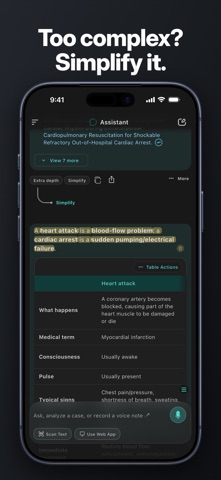
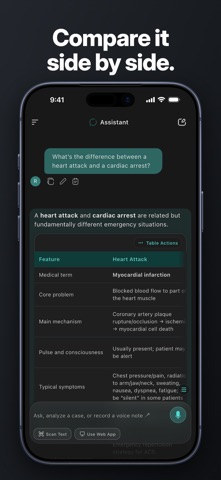
DoctorAI is your AI study companion for medicine. Ask by voice, by typing or with a scanned page, and get clear, structured answers you can highlight, annotate and come back to whenever you revise. Built for students and professionals in medicine, nursing, pharmacy, dentistry and allied health, DoctorAI helps you understand difficult topics, compare related conditions and turn your own study materials into questions. HOW IT WORKS 1. Ask – type, speak or scan a page. 2. Understand – read an answer organised with key points, tables and sources. 3. Keep it – highlight what matters, add notes and find everything again later. ASK YOUR WAY Type a question, record it by voice when that is quicker, or scan a page from your lecture notes or textbook. Short questions, long questions and follow-ups all work in the same conversation. CLEAR, STRUCTURED ANSWERS Answers are organised to be easy to read at a glance: headings, key points, comparison tables and step-by-step explanations. Research sources are listed under answers so you can read further. SIMPLIFY OR GO DEEPER Too complex? Turn an answer into a simpler version. Need more? Add extra depth to the same topic and keep both versions in your conversation. SCAN TEXT FROM YOUR STUDY MATERIALS Point your camera at a page, or choose a photo or file. Review and edit the extracted text, preview tables, then use it in your question. HIGHLIGHTS AND NOTES Mark important sentences and tables, add your own notes, and open them all in one place: Notes & Highlights. STAY ORGANISED Search your chats, pin and rename conversations, star important messages, and share a chat link or a table as an image with classmates. CONTINUE ON YOUR COMPUTER Open DoctorAI Web in your browser and connect it with a QR code to keep studying on a bigger screen. PRIVATE AND BACKED UP Your chats are stored on your device. Back up and restore your chats, notes and highlights, and lock the app with a PIN if you share your device. MADE FOR YOU Use DoctorAI in English, Arabic, Chinese, French, German, Italian, Japanese, Korean, Portuguese and Spanish, in light or dark mode. A built-in tutorial shows what each feature does whenever you need it. IDEAS FOR USING DOCTORAI • Preview a topic before a lecture and ask about the parts you do not understand. • Compare two conditions side by side in a table before an exam. • Scan a handout and ask for its key points. • Ask by voice when typing is inconvenient. • Simplify a difficult answer, then add extra depth once the basics are clear. • Save highlights and notes to build your own revision list. FOR EDUCATION AND INFORMATION DoctorAI supports learning. It is not a substitute for professional medical advice, diagnosis or treatment. Consult a qualified healthcare professional for personal health concerns. Do not use DoctorAI for emergencies. AI-generated answers and sources can contain errors, so verify important information against trusted resources. SUBSCRIPTIONS Sign-in required. Some features require a subscription. DoctorAI offers monthly Basic and Pro subscriptions, and optional credit packs. Payment is charged to your Apple Account at confirmation of purchase. Subscriptions renew automatically unless cancelled at least 24 hours before the end of the current period. You can manage or cancel your subscription in your App Store account settings. Privacy Policy: https://doctoraicompany.com/privacy-policy/ Terms of Use (EULA): https://www.apple.com/legal/internet-services/itunes/dev/stdeula/
Screenshots