Temp Mail - Temporary Mail Box
Hoang Dai

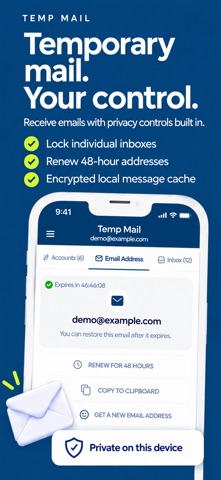
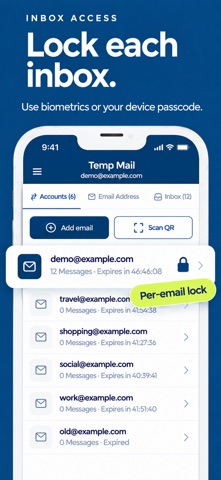
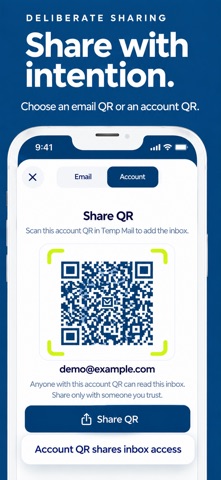
Create temporary email addresses for everyday sign-ups and keep routine messages separate from your personal inbox. Temp Mail is a receive-only email app with controls for reading and storing messages on your device. No app account is required. PROTECT ACCESS ON THIS DEVICE Lock each saved email separately with Face ID, Touch ID, or your device passcode. Locked inboxes require authentication again after the app goes into the background. These locks protect access within this installation; they do not reserve an address exclusively for you or prevent access through another device or service. CONTROL HOW MESSAGES ARE DISPLAYED Choose Controlled mode for structured message rendering or WebView for email layouts that need browser rendering. Controlled is the default. External images load automatically by default and can be disabled in Settings. Loading external images may reveal that you opened the message to the image host. Web links open only after you confirm their destination. Export a message as a plain-text file using the iOS share sheet. MANAGE YOUR ADDRESSES Choose a custom name and an available domain. Switch between saved addresses, copy an address, or share it as an Email QR. Use Account QR to transfer mailbox access to another installation. The scanner accepts supported Temp Mail Account QR codes and shows the address for confirmation before importing. Share Account QR codes only with people you trust. FREE PLAN: 48-HOUR ADDRESS TIMER The free plan includes ads and a 48-hour address activation period. Renew an active address or complete a rewarded ad to request restoration after expiry, subject to ad and mail-service availability. This timer is separate from server message retention. LOCAL MESSAGE STORAGE Downloaded message bodies are encrypted on this device. Clear the private cache in Settings or remove a saved inbox. These actions remove local data; they do not delete copies already shared or exported elsewhere. OPTIONAL PREMIUM Choose a monthly or yearly subscription to remove ads and keep all existing and new supported email addresses active while Premium is active. No manual address renewal is needed during that time. Premium does not extend server message retention or recover deleted mail. SUBSCRIPTION DETAILS Payment is charged to your Apple Account. Prices are shown in the app and confirmed by Apple. Subscriptions renew automatically unless canceled before renewal. Manage or cancel in Apple Account settings. Benefits continue until the paid period ends. Restore purchases from the Premium screen. IMPORTANT Temporary addresses and messages may become unavailable. Do not use them for sensitive information, important accounts or account recovery. The app receives email; it cannot send email. Terms of use: https://mail-inbox-e635a.web.app/terms.html Privacy policy: https://mail-inbox-e635a.web.app/privacy.html
Screenshots