MiepMiep: Mileage Tracker
Kevin Beckers

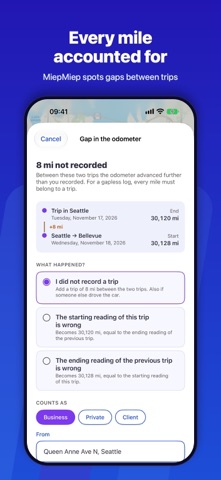
MiepMiep logs your trips and odometer readings, for business and private driving. No account, no subscription, no server: your trips live only on your own iPhone. Start a trip with one tap, with Siri, or automatically as soon as your iPhone connects to your car. MiepMiep records the route, the distance and the start and end address. When you stop, confirm the odometer reading and the trip is done. A LOG THAT ADDS UP For every vehicle, MiepMiep checks that your odometer readings connect. A missing reading, an end reading below the start, or a gap between two trips is flagged right away. Add a forgotten trip manually or correct a reading, and your log stays complete from the first kilometer to the last. BUSINESS AND PRIVATE - "Business" and "Private" tags are ready to use; add your own tags too. - Tag rules apply the right tag automatically by day, time window and vehicle. - A monthly bar shows how your distance splits between business and private. - Company car with a Dutch license plate? MiepMiep tracks your private kilometers against the Dutch 500 km limit. MULTIPLE VEHICLES - Each vehicle keeps its own series of odometer readings. - License plate styles for the Netherlands, Belgium, Germany, France, Luxembourg, Austria and the United Kingdom. - MiepMiep recognizes your car by its Bluetooth connection and suggests the right vehicle. - The start reading is pre-filled with the end reading of the previous trip. AUTOMATIC START AND STOP Add Start trip and Stop trip to an automation in the Shortcuts app for CarPlay or your car's Bluetooth. Your trip then starts when your iPhone connects to the car and stops when it disconnects. Switch the engine off and on again briefly, and the same trip carries on. The app explains step by step how to set it up. Prefer your voice? Say "Start trip in MiepMiep". NEVER FORGET TO STOP Standing still for 10 minutes while a trip is running? You get a reminder. You can turn it off. CSV EXPORT Export your trips as a CSV file, filtered by period, vehicle and tag. It opens cleanly in Excel and Numbers, with date, times, vehicle, plate, addresses, odometer readings, distance, tags and notes. If the readings don't add up, MiepMiep warns you before the export. BACKUP IN YOUR HANDS Put all your trips in a single backup file and keep it wherever you like, for example in iCloud Drive. MiepMiep can also do this automatically, in a folder you choose. Restore from the app or by opening the file. PRIVACY - No account, no server of our own, no ads, no analytics, no tracking. - In the background, MiepMiep uses your location only during a trip. Without a trip, the app doesn't follow you and uses no battery for it. - Your trips only leave your device when you export them or save a backup. - Logging works without internet. Only the map and address lookup use Apple services, and you can turn address lookup off. PAY ONCE Buy MiepMiep once. No subscription, no monthly fees. MiepMiep is available in English, Dutch, German and French, in kilometers or miles. Please note: MiepMiep helps you keep a complete mileage log. Check that your records meet the requirements of your tax authority or employer. Continued use of GPS in the background can decrease battery life.
Screenshots