HAA Home for HomeKit & Matter
Jose Antonio Jimenez Campos

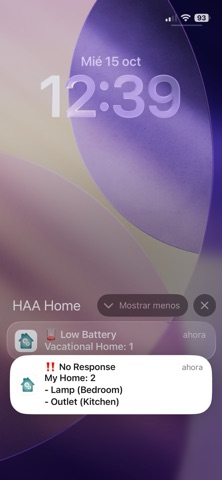
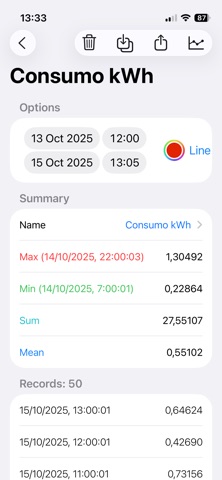
HAA Home is the best companion to manage and configure the HomeKit accessories in your home. Manage all your home devices, using all available features with a great user interface: See remain batteries at a glance, check power and consumptions with beautiful charts using HAA firmware, temperatures, times that a door opens... Take care of your home using a local background monitoring process and receive 'Low Battery' and 'No Response' notifications. Check battery status at a glance. With Apple Shortcuts support, read and write over any HomeKit characteristic visible in HAA Home. Access to extra features of other HomeKit accessories manufacturers, like microphones and speakers volume, battery, etc. And even more, with HAA firmware features: - Update your HAA devices and enter setup mode without declaring any extra switch or control. - Open HAA Setup Web directly. - Get extra information of HAA devices, like IP address, mDNS and HomeKit status. - Check HAA new versions. - Update all HAA accessories at once. - Read and save Data History. You will can have a complete registry when a light is turned on, the temperature of a room, or when a motion sensor is triggered. - Discover unpaired HAA devices connected to network in setup mode. - See all firmware versions at once. - See HomeKit logs in real time. - Capture HAA Network logs from port UDP-45678. - mDNS logs for HomeKit IP devices. - Show consumption data in HAA Power Meter accessories. * Advanced Features (require a subscription plan): - Improved User Interface: Add icons and better controls to have a great experience managing all accessories. - 'Low Battery' and 'No Response' notifications: Take care of your homes using a local background monitoring process. - Apple Shortcuts support: Read and write over any HomeKit characteristic visible in HAA Home, and scheduled retrieval of Data Histories in the background via Shortcuts. - HAA FX Lightning Effects: Manage all settings of your HAA Lightbulb FX effects. - Charts for Data History Services: Create custom smart charts to see and manage all information at a glance. - Manage your HAA Scripts in an easy way: Create, edit, delete, and keep all your MEPLHAA scripts organized in one place, synced across all your Apple devices via iCloud. - Save backups of your device scripts: With just one click, backup the scripts of all your HAA devices in just a few seconds. - Exclude selected devices from batch updates: When you update the firmware of all your HAA devices at once, you can leave the ones you want unupdated. - Swipe to update and enable setup mode: Use swipe gestures to quickly update an HAA device or put it into setup mode. - Copy and Paste from Everywhere: With a simple tap, copy any property value to the clipboard. Using this App, you are able to manage all accessory types that can be build with HAA firmware, and even others from different manufacturers. Translations, done by: - Dutch: tsprenk - Italian: Andrea Scubla (TriderG75) - Korean: Kim Woojoo (w0uldy0u) - Polish: XSzuflaX - Portuguese: Tiago Lagarto - Swedish: Emil Löfblom - Ukrainian and Russian: Vadym Korneliuk (xrust83) Terms of Use: https://www.apple.com/legal/internet-services/itunes/dev/stdeula/
Screenshots