MyCam Pro – 48MP Manual ProCam
Naoya Maeda

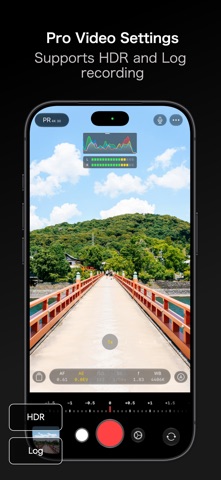
◉ 48 MP / 24 MP rear and 18 MP front photos ◉ Apple ProRAW / Bayer RAW capture ◉ Manual shutter speed / ISO / white balance / focus / aperture ◉ 4K / Log / ProRes video ◉ Cinematic stabilization for smooth handheld video ◉ Quick Lock Screen launch so you never miss a shot ◉ Powerful tools to edit photos your way ● About MyCam Pro 2 MyCam Pro 2 brings high-resolution photos, RAW, manual controls, 4K, Log, ProRes, and more to your iPhone camera. Focus peaking, zebras, histograms, photo editing, and Apple Watch integration give you greater control over every shot. ● Key Features ■ Capture - Photo ・48 MP / 24 MP rear camera ・18 MP front camera ・Square-sensor aspect ratios on the front camera *1 ・Live Photos ・Apple ProRAW / Bayer RAW (RAW / RAW+L) ・ProRAW formats (JPEG Lossless / JPEG-XL Lossless / Lossy) ・Aspect ratios (1:1 / 4:3 / 3:2 / 16:9 / 5:4 / 9:7 / 10:7) ・Responsive capture processing ・Deep Fusion ・Photo quality (Unprocessed / Standard / Processed) ・Formats (HEIC / JPEG / TIFF) ・Low-resolution capture (0.1 MP - 6 MP) ・Custom size (300px - 3000px) ・Date stamp ・LUT (.cube) ・QR scanning ・Face detection ・Portrait (depth map) *1: Requires an 18 MP Center Stage front camera. - Video ・4K video ・Resolution (HD / FHD / 4K / VGA) ・Frame rate (24 / 25 / 30 / 48 / 50 / 60 fps; up to 120 fps on supported devices) ・Stabilization (Standard / Cinematic) ・HDR (Rec.2020 HDR) ・Codec (HEVC / H.264 / ProRes; Log: ProRes) *3 ・Color space (Rec.709 / P3 D65 / Rec.2020 HDR / Apple Log) *3 ・Audio (Mono / Stereo / Spatial Audio) *2 ・Audio meter (Off / Line / Segments) ・Apple ProRes Log ・Cinematic video ・Time-lapse ・Slow motion ・Quick video *2: Spatial Audio requires a supported device. *3: Combinations vary by device and settings. Log uses ProRes. - Capture Tools ・Manual controls (Focus / Exposure / Shutter / ISO / WB / Aperture) ・Exposure (Auto / Manual / Shutter Priority / Aperture Priority) *4 ・Lenses (Ultra Wide / Wide / Telephoto / Auto) ・Macro toggle ・Histogram (RGB / Luma Waveform / Luma Bar) ・Focus Peaking / Zebras ・Grid / Level ・Timer / Interval ・Flash / Torch ・AirPods remote shutter ・Bluetooth remote shutter ・Metadata editing *4: Shutter / Aperture Priority require variable aperture. ■ Photo Editing ・Brightness / Contrast / Temperature / Vibrance ・Highlights / Shadows / Vignette ・Film-style effects ・Tone Curve ・64 filters ・40 light leaks ・20 scratch effects ・Grain / Blur / Skin correction ・LUT (.cube) ・Editing presets ■ Gallery & Media ・View / edit EXIF ・Automatic photo editing ・Resize / rotate / duplicate photos ・Save to Photos / Files / Lightbox ・Biometric-protected private folder ■ Widgets ・Home Screen / Lock Screen / Control widgets ・Live Activities ※Shortcut buttons are customizable. ■ Quick Access ・Quick launch from Lock Screen Camera Control ・Quick Actions ・Action Button ■ Apple Watch ・Real-time preview ・Remote capture ・Photo preview ・Live Activities ■ Integrations ・Shortcuts app ・Share Sheet ● Notes ※In-app purchase required for: ・4K / 60 fps video ・Cinematic stabilization ・Cinematic video ・Apple ProRes Log ・Slow motion ・Time-lapse ・Batch photo auto-edit / rotate / resize ・LUT (.cube) in Photo mode ・Some filters ・Biometric-protected private folder ※TIFF cannot be used with Live Photos, RAW, 18 MP, or 24 MP. ※18 MP / 24 MP are unavailable when saving to Files. Lock Screen captures are saved to Photos. ※4K / 60 fps ProRes requires external storage with 220 MB/s+ write speed and max power use of 4.5 W. 4K / 120 fps requires 440 MB/s+. ※On-device ProRes can use Pro Video Storage on supported devices with iOS 27 or later. ※48 MP rear photos are available on numbered iPhone models from iPhone 14 Pro onward. ※48 MP lens availability varies by device. ※18 MP front photos are available on iPhone 17 models. MyCam Pro 2 is continuously updated for new iOS technologies and improved stability. For requests or bugs, use Feedback in the app. Contact: contact.dev.n.m@gmail.com
Screenshots