WatchAnything - watch faces
Marc Hofmann

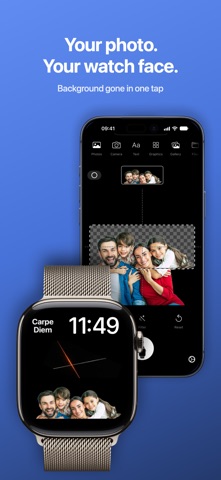
Put your favorite pictures on your Apple Watch face. WatchAnything turns photos, graphics and text into complications – round or wide, on the watch faces you already love. HOW IT WORKS • Pick a picture: from Photos, the camera, Files or the clipboard – or use the built-in graphics and text • Frame it: choose round or wide and pinch to zoom. With faces in the picture, the crop sets itself • Send it: one tap and the picture is on your watch. Then touch and hold the watch face, tap Edit and choose WatchAnything BACKGROUND GONE IN ONE TAP "Cut out" removes the background. Family, dog or favorite subject stand out on the watch face. ART FOR YOUR WRIST Nearly 300 abstract graphics, round and wide. Tint them in any color to match your watch face or band, and combine several on one face. YOUR WORDS Names, initials or a favorite quote: type a text and pick font and size. Line breaks and size adjust automatically. CREATE WITH APPLE INTELLIGENCE Where Apple Intelligence is available, create new pictures with Image Playground right in the app. ALBUMS AS SLIDESHOWS Put pictures in an album and the complication changes them at the pace you choose. The gallery keeps every picture, also for a new or second watch. FINISHING TOUCHES Filters for brightness, contrast and accent color, plus a soft edge for smooth transitions. PRIVATE No account, no tracking, no ads. Your pictures stay on your devices and in your private iCloud. When the watch is locked, WatchAnything shows nothing. ALL INCLUDED No in-app purchases, no subscription. Requires an iPhone with iOS 17 or later and an Apple Watch with watchOS 10 or later – including older models from Series 4 and SE. Image Playground requires an iPhone with Apple Intelligence. WatchAnything shows pictures in complications on your watch faces; it does not replace entire watch faces.
Screenshots