Code Analyzer
卿 徐

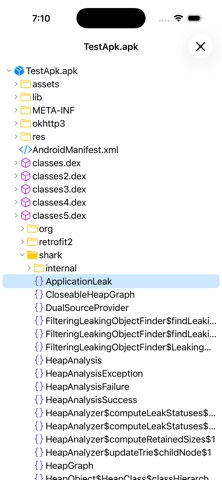
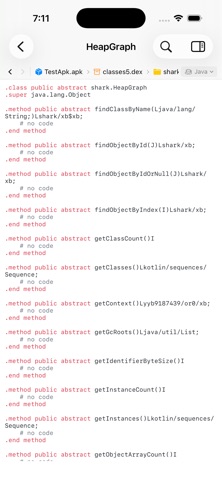
For the latest, full-featured Code Analyzer experience, download Code Analyzer from the Mac App Store. Code Analyzer turns opaque software into a workspace you can navigate. Analyze APK, JAR, and JMOD archives, inspect Mach-O and ELF binaries and font files, and move naturally from package structure to readable code, functions, symbols, assembly, and raw bytes. Code Analyzer combines an APK analyzer, JAR/JMOD decompiler, native disassembler, font glyph viewer, bytecode viewer, and hex viewer in one focused iPhone and iPad workspace. There is no command-line setup and nothing to upload. PACKAGE AND BYTECODE ANALYSIS • Open APK packages and browse files, compiled classes, decoded resources, and manifest data • Decompile supported class files from JAR and JMOD archives into readable high-level output • Fall back to low-level bytecode automatically when a higher-level result is unavailable • Follow nested ZIP, APK, and JAR containers in place without manually unpacking them NATIVE BINARY ANALYSIS • Inspect Mach-O universal binaries, dynamic libraries, application bundles, and frameworks • Explore ELF executables and shared libraries across multiple CPU architectures • Browse architecture slices, headers, segments, sections, symbols, and discovered functions • Explore ELF and Mach-O machine code in a continuous, architecture-aware disassembly view • Jump directly to discovered functions and symbols, including useful results from stripped binaries FIND THE SIGNAL • Open TrueType, OpenType, and font collections in a searchable glyph viewer with metadata and outline inspection • Use Quick Open to find files, classes, methods, resources, and symbols with responsive fuzzy matching • Filter Project Explorer by filename to find files quickly • Search raw data as text or hex and step through every match • Jump to decimal or hexadecimal offsets without losing context • Copy any byte selection as hex, text, or Base64 • Keep syntax highlighting and symbol outlines beside the content you are reading ANALYZE ON THE GO • Native SwiftUI interface adapted for iPhone and iPad • Responsive background processing for large, multi-part files • Runs entirely offline, so your files stay on your device Built for developers, security professionals, and students who need clear answers from software they are authorized to inspect.
Screenshots