Vocal Remover, Cut Song Maker
Vocal Remover AI& Photo Enhancer & FM Radio Player

4.2 stars25,887 reviews1,000,000+Free
Music & AudioEveryoneVersion 2.1.1.2Updated 4/29/2025, 11:25:43 AM
Open in StoreAI accompaniment to extract instrument tracks, automatically identify vocals, accompaniment, drums, bass, piano and other instrumental sounds in songs, pick up the score easily.
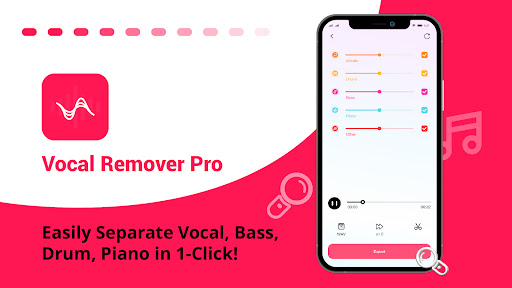
Vocal Remover Pro - Separate vocals and accompaniment, easily remove vocals, which is your assistant for practicing music and making music.
🎹 Extract piano sound for practicing piano and singing!
🎙️ Remove vocals, practice singing with backing track!
🥁 Remove drums, remix guitar, bass and other tracks, practice playing skills!
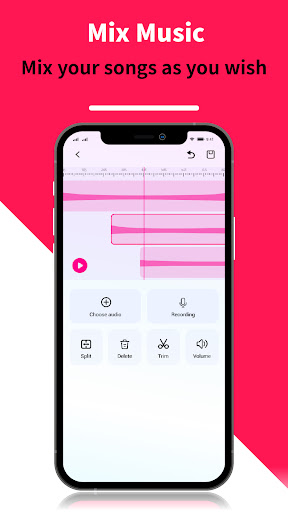
🎼 Easily create songs, and mix audio tracks!
🎶 Convert song to karaoke, create backing tracks!
🎸 Intelligent separation of vocals and instruments, help you rehearse live!
Split audio tracks in a few steps
- Step 1: Open Vocal Remover Pro, select audio or videos.
- Step 2: Select the number of separate tracks.
eg: Two tracks(vocal and accompaniment). Three tracks(vocal, backing track and others)...
- Step 3: When the audio separation complete, you can export the tracks, or mix tracks.
In addition to split audio track & remove vocals, you can also use these features:
✂️Easily to cut audio and trim music
· Cut music in milliseconds, accurate and fast cut music
· Support cut music several times and save the final works
· You can choose to cut the middle part of the audio, or cut the beginning and end of the audio
✨Music editing functions
· Audio mixer to mix different instrument sounds
· Fade in and fade out, make the music more soothing and melodious
· Change tone and tempo, create music easily
· Change playback speed, speed up or slow down the music playback speed
🤘Multitrack editing, mixer to make music easily
· Audio mixer to mix different instrument sounds
· Split one audio into multiple tracks, cut music and make music
· Add background music to your recording
· More features are waiting for you to explore, making music in just a few steps!
🔊Adjust volume, volume booster
· Freely adjust the audio volume, increase or decrease the volume
🤖Voice changer
· Change your audio voice to female voice, old man voice, robot voice, etc
· Custom the tone, pitch, speed, make music more interesting
🎧Convert video to audio
· MP4 to mp3, you can listen to it anytime, anywhere
· Download the music video, and then convert it to audio
🎼Convert format
· Audio format not applicable? Try this format converter, support multiple formats, mp3, wav, flac, etc.
🥰Batch processing: Support batch separate audio tracks, batch extracte accompaniment.
🎶Provide 2000+ music material, you can use them, now to create music!
A track separation tool & mixer designed for musicians, try Vocal Remover Pro now and create music like never before!👍If you want to practice singing, but can't find the accompaniment, if you are still looking for a music creation tool to make ringtones, now try Vocal Removal Pro!
Vocal Remover Pro, a professional autio separation tool,
If you have any questions or suggestions, please contact us at vocalremoverpro@outlook.com. Have a great day!
Vocal Remover Pro - Separate vocals and accompaniment, easily remove vocals, which is your assistant for practicing music and making music.
🎹 Extract piano sound for practicing piano and singing!
🎙️ Remove vocals, practice singing with backing track!
🥁 Remove drums, remix guitar, bass and other tracks, practice playing skills!
🎼 Easily create songs, and mix audio tracks!
🎶 Convert song to karaoke, create backing tracks!
🎸 Intelligent separation of vocals and instruments, help you rehearse live!
Split audio tracks in a few steps
- Step 1: Open Vocal Remover Pro, select audio or videos.
- Step 2: Select the number of separate tracks.
eg: Two tracks(vocal and accompaniment). Three tracks(vocal, backing track and others)...
- Step 3: When the audio separation complete, you can export the tracks, or mix tracks.
In addition to split audio track & remove vocals, you can also use these features:
✂️Easily to cut audio and trim music
· Cut music in milliseconds, accurate and fast cut music
· Support cut music several times and save the final works
· You can choose to cut the middle part of the audio, or cut the beginning and end of the audio
✨Music editing functions
· Audio mixer to mix different instrument sounds
· Fade in and fade out, make the music more soothing and melodious
· Change tone and tempo, create music easily
· Change playback speed, speed up or slow down the music playback speed
🤘Multitrack editing, mixer to make music easily
· Audio mixer to mix different instrument sounds
· Split one audio into multiple tracks, cut music and make music
· Add background music to your recording
· More features are waiting for you to explore, making music in just a few steps!
🔊Adjust volume, volume booster
· Freely adjust the audio volume, increase or decrease the volume
🤖Voice changer
· Change your audio voice to female voice, old man voice, robot voice, etc
· Custom the tone, pitch, speed, make music more interesting
🎧Convert video to audio
· MP4 to mp3, you can listen to it anytime, anywhere
· Download the music video, and then convert it to audio
🎼Convert format
· Audio format not applicable? Try this format converter, support multiple formats, mp3, wav, flac, etc.
🥰Batch processing: Support batch separate audio tracks, batch extracte accompaniment.
🎶Provide 2000+ music material, you can use them, now to create music!
A track separation tool & mixer designed for musicians, try Vocal Remover Pro now and create music like never before!👍If you want to practice singing, but can't find the accompaniment, if you are still looking for a music creation tool to make ringtones, now try Vocal Removal Pro!
Vocal Remover Pro, a professional autio separation tool,
If you have any questions or suggestions, please contact us at vocalremoverpro@outlook.com. Have a great day!
Developer email
vocalremoverpro@outlook.com
Developer website
https://www.61jk.com/index.htmlReleased
Aug 14, 2022
Current version
2.1.1.2
Android version
8.0
Reviews & Ratings
4.2
out of 5
5
4
3
2
1
⚠️ Users report mixed experiences
25,887 reviewsScreenshots