Android TV Remote
Miled Apps Studio

3.5 stars206 reviews50,000+Free
House & HomeMature 17+Version 3.9Updated 5/29/2025, 2:47:00 PM
Open in StoreRemote Control for Android TV – The Ultimate Smart Remote for Android TV.
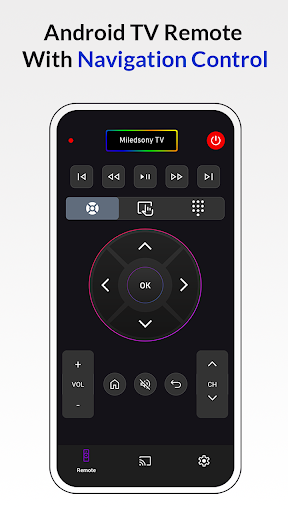
Remote Control for Android TV will transform your Android smartphone into a complete Android TV Remote. It will help you diversify your daily Chromecast TV routine and make it more convenient for you to use your new Remote for Android TV. Also, it can handle several different devices with only one Android TV remote.
Navigation Control, Touchpad Navigation, Number Keys, Adjust Volume, Switch Channels, Browse Apps, Cast to TV, Screen Mirroring & even use Voice Search— all from your phone.
Supported TV Brands
Xiaomi TV, TCL TV, Changhong TV, Sony TV, Skyworth TV, Google-Chromecast, Haier TV, SWTV, Any brands TV running on Android or Google TV OS.
-: Key Features :-
* One Android TV Smart TV application can control different TVs with your smartphone
* No setup is required. Android TV Remote automatically scans your network to find your TV
* Screen Mirroring & Cast your mobile phone media like photo, video & music to TV
* Powerful Voice Control with Voice Search
* Mouse-like navigation using Touch Pad
* Control apps installed on your Smart TV
* You don’t need to learn every button from scratch; they are all the same.
* Always in your pocket
* Forget about batteries
* Notice: In order to connect to Android Smart TV device, both the Smart TV and Android device must be connected to the same network.
Works with all Android TV devices.
Download Remote Control for Android TV today and take complete control of your entertainment!
Remote Control for Android TV will transform your Android smartphone into a complete Android TV Remote. It will help you diversify your daily Chromecast TV routine and make it more convenient for you to use your new Remote for Android TV. Also, it can handle several different devices with only one Android TV remote.
Navigation Control, Touchpad Navigation, Number Keys, Adjust Volume, Switch Channels, Browse Apps, Cast to TV, Screen Mirroring & even use Voice Search— all from your phone.
Supported TV Brands
Xiaomi TV, TCL TV, Changhong TV, Sony TV, Skyworth TV, Google-Chromecast, Haier TV, SWTV, Any brands TV running on Android or Google TV OS.
-: Key Features :-
* One Android TV Smart TV application can control different TVs with your smartphone
* No setup is required. Android TV Remote automatically scans your network to find your TV
* Screen Mirroring & Cast your mobile phone media like photo, video & music to TV
* Powerful Voice Control with Voice Search
* Mouse-like navigation using Touch Pad
* Control apps installed on your Smart TV
* You don’t need to learn every button from scratch; they are all the same.
* Always in your pocket
* Forget about batteries
* Notice: In order to connect to Android Smart TV device, both the Smart TV and Android device must be connected to the same network.
Works with all Android TV devices.
Download Remote Control for Android TV today and take complete control of your entertainment!
Developer email
miledappsstudio@gmail.com
Developer website
https://miledappsstudio.blogspot.com/app-ads.txtReleased
May 16, 2022
Current version
3.9
Android version
7.0
Reviews & Ratings
3.5
out of 5
5
4
3
2
1
😐 Reviews are mixed
206 reviewsScreenshots