Grounded: Parental App Lock
Flashlight Software

Grounded helps parents guide healthy device use. Block chosen apps, set app time limits, and secure changes with a parent PIN—while monitoring screen time to see what’s working.
What Grounded does
• Choose apps to block: Create an allowlist/denylist so only approved apps can open.
• Set per-app time limits: Add daily limits for specific apps to reduce distractions.
• Parent PIN protection: Lock settings and prevent uninstall without the PIN.
• Screen-time monitoring: View usage summaries to understand habits over time.
• Quick focus: Temporarily lock distracting apps during homework, dinner, or bedtime.
Why parents like it
• Simple & effective: Configure once; Grounded enforces the rules in the background.
• Local-only: No accounts, no cloud, no ads—your data stays on the device.
• Flexible: Different rules for different apps; quick overrides when needed.
How it works
1. Install Grounded and create your parent PIN.
2. Grant required permissions when prompted:
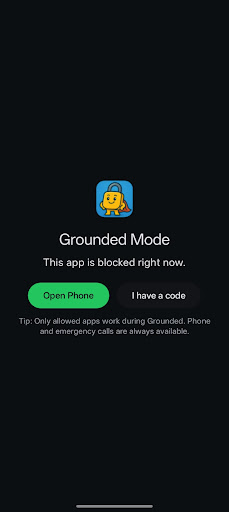
• Accessibility Service – to block restricted apps and show the lock screen.
• Usage Access – to monitor app usage and enforce time limits.
3. Pick apps to allow or block, and set any per-app time limits.
4. That’s it—Grounded will enforce your choices. Change settings anytime with your PIN.
Privacy & security
• Grounded does not collect, sell, or share personal data.
• No analytics, no ads, no tracking.
• The parent PIN is stored locally (hashed); app lists and usage stats remain on the device.
• Read our full privacy policy: http://flashlightsoftware.co.uk/grounded-privacy
Permissions explained
• Accessibility Service: Required to detect when a blocked app launches and to display the Grounded lock screen. Grounded uses this permission only for parental-control features.
• Usage Access: Used to monitor screen time and enforce time limits for selected apps.
• Device Admin (optional): Prevents uninstall without the parent PIN.
Notes & compatibility
• Designed for parents/guardians managing a child’s device.
• Some OEM launchers/settings may look different; follow in-app prompts to complete setup.
• Requires Android 8.0 (Oreo) or later.
Support
Questions or feedback? We’re here to help.
Flashlight Software Ltd – support@flashlightsoftware.co.uk
What Grounded does
• Choose apps to block: Create an allowlist/denylist so only approved apps can open.
• Set per-app time limits: Add daily limits for specific apps to reduce distractions.
• Parent PIN protection: Lock settings and prevent uninstall without the PIN.
• Screen-time monitoring: View usage summaries to understand habits over time.
• Quick focus: Temporarily lock distracting apps during homework, dinner, or bedtime.
Why parents like it
• Simple & effective: Configure once; Grounded enforces the rules in the background.
• Local-only: No accounts, no cloud, no ads—your data stays on the device.
• Flexible: Different rules for different apps; quick overrides when needed.
How it works
1. Install Grounded and create your parent PIN.
2. Grant required permissions when prompted:
• Accessibility Service – to block restricted apps and show the lock screen.
• Usage Access – to monitor app usage and enforce time limits.
3. Pick apps to allow or block, and set any per-app time limits.
4. That’s it—Grounded will enforce your choices. Change settings anytime with your PIN.
Privacy & security
• Grounded does not collect, sell, or share personal data.
• No analytics, no ads, no tracking.
• The parent PIN is stored locally (hashed); app lists and usage stats remain on the device.
• Read our full privacy policy: http://flashlightsoftware.co.uk/grounded-privacy
Permissions explained
• Accessibility Service: Required to detect when a blocked app launches and to display the Grounded lock screen. Grounded uses this permission only for parental-control features.
• Usage Access: Used to monitor screen time and enforce time limits for selected apps.
• Device Admin (optional): Prevents uninstall without the parent PIN.
Notes & compatibility
• Designed for parents/guardians managing a child’s device.
• Some OEM launchers/settings may look different; follow in-app prompts to complete setup.
• Requires Android 8.0 (Oreo) or later.
Support
Questions or feedback? We’re here to help.
Flashlight Software Ltd – support@flashlightsoftware.co.uk
Developer email
support@flashlightsoftware.co.uk
Developer website
https://www.flashlightsoftware.co.uk/Released
Oct 14, 2025
Current version
1.0
Android version
8.0
Screenshots