Опендатабот
908 Inc

Opendatabot — check companies, people, cars, real estate and CCC fines.
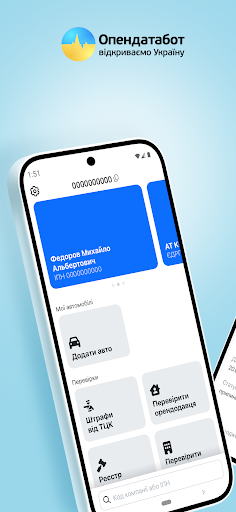
Opendatabot — is an application for quick check of people and companies in state registers. Get data from official sources.
What can be checked in Opendatabot:
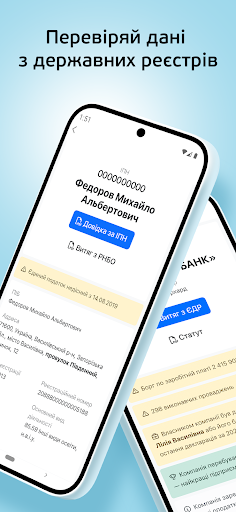
- Person by TIN/RNOKPP: business, real estate, cars, debts, sanctions, enforcement proceedings.
- Company by EDRPOU: registration data, managers, founders, types of activities, possible risks.
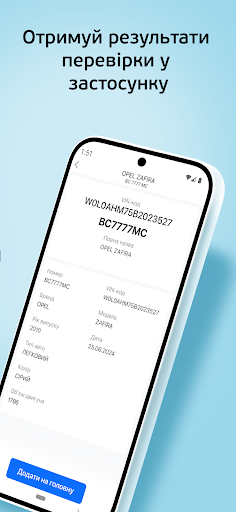
- Car by state license plate: registration, model, year of manufacture, VIN-code, arrests and encumbrances.
- Real estate by TIN of the owner: address, registration number, apartment, house, land, arrests and restrictions.
Available certificates and extracts:
- Extract from the Unified State Register (USR or TIN)
- Company's statutory documents
- Register of debtors of Ukraine
- Register of individuals under NSDC sanctions
- Check of fines from the CCC
- Check of the landlord
- Extract from the DRORM (encumbrances on movable property)
- Database of people search of the Ministry of Internal Affairs and the Security Service of Ukraine
- Extract from the real estate register (apartments, houses, land plots, arrests, encumbrances)
Advantages of Opendatabot:
- Data from the official open data portal - https://data.gov.ua
- More than 5 million users are already checking information through Opendatabot
- Simple and intuitive interface for quick search
Download Opendatabot right now!
Checking companies, people, cars and real estate has never been so fast and convenient.
Terms of Use: https://opendatabot.ua/about/terms
Privacy Policy: https://opendatabot.ua/about/policy
Opendatabot — is an application for quick check of people and companies in state registers. Get data from official sources.
What can be checked in Opendatabot:
- Person by TIN/RNOKPP: business, real estate, cars, debts, sanctions, enforcement proceedings.
- Company by EDRPOU: registration data, managers, founders, types of activities, possible risks.
- Car by state license plate: registration, model, year of manufacture, VIN-code, arrests and encumbrances.
- Real estate by TIN of the owner: address, registration number, apartment, house, land, arrests and restrictions.
Available certificates and extracts:
- Extract from the Unified State Register (USR or TIN)
- Company's statutory documents
- Register of debtors of Ukraine
- Register of individuals under NSDC sanctions
- Check of fines from the CCC
- Check of the landlord
- Extract from the DRORM (encumbrances on movable property)
- Database of people search of the Ministry of Internal Affairs and the Security Service of Ukraine
- Extract from the real estate register (apartments, houses, land plots, arrests, encumbrances)
Advantages of Opendatabot:
- Data from the official open data portal - https://data.gov.ua
- More than 5 million users are already checking information through Opendatabot
- Simple and intuitive interface for quick search
Download Opendatabot right now!
Checking companies, people, cars and real estate has never been so fast and convenient.
Terms of Use: https://opendatabot.ua/about/terms
Privacy Policy: https://opendatabot.ua/about/policy
Developer email
support@opendatabot.com
Developer website
https://opendatabot.uaReleased
Oct 3, 2024
Current version
2.11.360
Android version
7.0
Screenshots