NextThing for GTD
dmit_mit_studio

NextThing is a task management app built around the Getting Things Done (GTD) methodology by David Allen. It gives you a complete system to capture, clarify, organize, and review everything on your mind — so you can focus on doing.
How it works
• Capture everything into your Inbox — tasks, ideas, reminders
• Process your inbox with the built-in GTD clarify workflow
• Organize into Next Actions, Projects, Waiting For, Someday/Maybe, and Scheduled lists
• Assign contexts (@Home, @Work, @Errands) and contacts to tasks
• Review with the Weekly Review checklist to stay on track
Key features
• Quick capture with smart tag parsing — type #context, @contact, ~project, !!priority inline
• GTD inbox processing — guided clarify and organize workflow
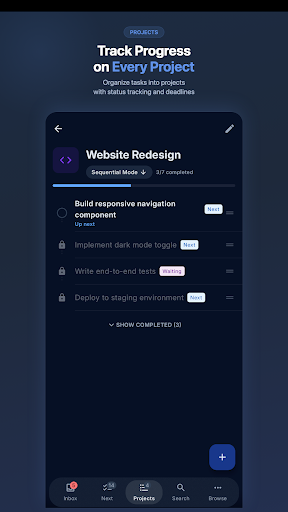
• Projects with task lists and progress tracking
• Contexts and contacts for filtering by where you are or who you need
• Scheduled and deferred tasks with notifications
• Search across all tasks and projects
• Wear OS companion app for quick capture on your wrist
• Syncs across Android, iOS, and Desktop
• Offline-first — works without internet, syncs when connected
• Clean, minimal design that stays out of your way
Why GTD?
Getting Things Done is a proven productivity method trusted by millions. Instead of keeping everything in your head, you capture it in a trusted system and organize it by actionability. The result: less stress, more clarity, and consistent progress on what matters.
NextThing makes GTD practical and accessible — no complex setup, no learning curve. Just open the app and start capturing.
How it works
• Capture everything into your Inbox — tasks, ideas, reminders
• Process your inbox with the built-in GTD clarify workflow
• Organize into Next Actions, Projects, Waiting For, Someday/Maybe, and Scheduled lists
• Assign contexts (@Home, @Work, @Errands) and contacts to tasks
• Review with the Weekly Review checklist to stay on track
Key features
• Quick capture with smart tag parsing — type #context, @contact, ~project, !!priority inline
• GTD inbox processing — guided clarify and organize workflow
• Projects with task lists and progress tracking
• Contexts and contacts for filtering by where you are or who you need
• Scheduled and deferred tasks with notifications
• Search across all tasks and projects
• Wear OS companion app for quick capture on your wrist
• Syncs across Android, iOS, and Desktop
• Offline-first — works without internet, syncs when connected
• Clean, minimal design that stays out of your way
Why GTD?
Getting Things Done is a proven productivity method trusted by millions. Instead of keeping everything in your head, you capture it in a trusted system and organize it by actionability. The result: less stress, more clarity, and consistent progress on what matters.
NextThing makes GTD practical and accessible — no complex setup, no learning curve. Just open the app and start capturing.
Developer email
support@nextthinggtd.com
Developer website
https://nextthinggtd.com/Released
May 28, 2026
Current version
1.0
Android version
7.0
Screenshots