PDF to Word Converter
SmartApps38

4.7 stars271,706 reviews10,000,000+Free
ToolsEveryoneVersion 28Updated 11/8/2025, 10:09:14 AM
Open in StorePDF is a very versatile document format – but it's difficult to edit it. To extract quotes or edit a text, you have to convert PDF to editable Word documents.
Using OCR (Optical Character Recognition), you can even make scanned book pages editable. Don't waste time copying text manually, let us do the work for you!
Convert your PDF file into editable word documents with best PDF to Word converter. Preserve the PDF files' fonts, paragraphs, lists, tables, and columns in the Word output. You can then edit the word document, extract its contents and republish in PDF as a new document. You don't need to register, login or give us your contact information.
Convert Scanned PDF to Word :
With this PDF converter you can convert PDF to editable Word documents. Convert from PDF to DOCX. If you want to know how to convert PDF to Word you came to the right place!
Here's how you easily convert PDF to Word
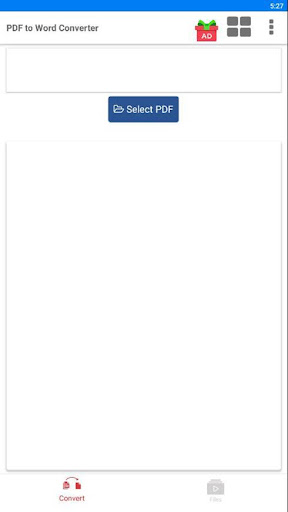
- Select a PDF file and click Convert
- Wait till the PDF is converted to Word. That's it!
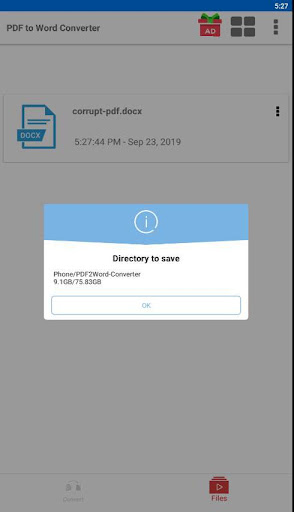
Files are saved on folder : Phone/PDF2Word-Converter
Using OCR (Optical Character Recognition), you can even make scanned book pages editable. Don't waste time copying text manually, let us do the work for you!
Convert your PDF file into editable word documents with best PDF to Word converter. Preserve the PDF files' fonts, paragraphs, lists, tables, and columns in the Word output. You can then edit the word document, extract its contents and republish in PDF as a new document. You don't need to register, login or give us your contact information.
Convert Scanned PDF to Word :
With this PDF converter you can convert PDF to editable Word documents. Convert from PDF to DOCX. If you want to know how to convert PDF to Word you came to the right place!
Here's how you easily convert PDF to Word
- Select a PDF file and click Convert
- Wait till the PDF is converted to Word. That's it!
Files are saved on folder : Phone/PDF2Word-Converter
Developer email
smartapps38@outlook.com
Released
Sep 23, 2019
Current version
28
Android version
2.0
Reviews & Ratings
4.7
out of 5
5
4
3
2
1
🌟 Loved by users
271,706 reviewsScreenshots