NLB Pay
NLB d.d.

3.9 stars11,769 reviews500,000+Free
FinanceEveryoneVersion 9.33.0Updated 8/17/2026, 9:40:04 AM
Open in StoreTry out NLB Pay mobile wallet for easy and secure payment free of charge.
What does the NLB Pay enable you to do?
- Paying for purchases in stores and withdrawing cash at contactless ATMs with Google Pay. You mobile phone with the NFC on and Google Pay as your default NFC app, just open, lean your phone towards the ATM or POS terminal and wait for the beep.
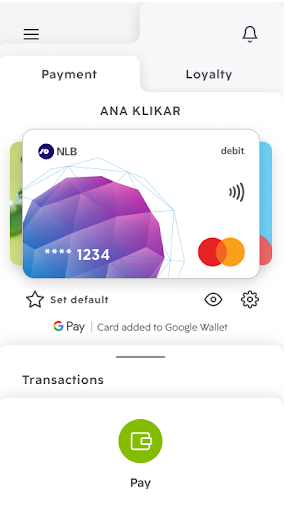
- All payments and withdrawals made are stored in the "Transactions" section.
- Confirming your online purchases. When paying with a card online, you will receive a message on your phone and simply confirm the payment in your mobile wallet (by using face recognition, fingerprint or the numeric password to enter NLB Pay).
- Transferring money to relatives and friends. With instant Flik payments, you can transfer money to other Flik users via their phone number. The money will be in their account in a few seconds even if they have a personal account opened with another bank.
- Manage card security settings. You can disable the card for ATM withdrawals, online payments, payments abroad and, if necessary, you can unlock or lock the card.
- Option to include merchant loyalty cards in NLB Pay
On which phones can you use NLB Pay?
NLB Pay is available to users of smartphones with the Android operating system (Nougat 7.0 and higher) or iOS (operating system 11.0 or later).
Safety comes first.
Due to the security requirements, NLB Pay does not work on mobile phones with changed factory settings or phones that have a changed preset program code (protection breach - "rooted" mobile phones). It also doesn't work if you don't have your phone secured / locked with at least one security feature - PIN, pattern, fingerprint, face recognition…
Important recommendations / information:
1. Select Google Pay as the default mobile wallet for contactless payment in the mobile phone settings
2. If you cannot log in to NLB Pay, check in the phone settings - "Mobile Network" whether you have a Proxy (proxy server) entered. If the answer is "YES", delete it.
What does the NLB Pay enable you to do?
- Paying for purchases in stores and withdrawing cash at contactless ATMs with Google Pay. You mobile phone with the NFC on and Google Pay as your default NFC app, just open, lean your phone towards the ATM or POS terminal and wait for the beep.
- All payments and withdrawals made are stored in the "Transactions" section.
- Confirming your online purchases. When paying with a card online, you will receive a message on your phone and simply confirm the payment in your mobile wallet (by using face recognition, fingerprint or the numeric password to enter NLB Pay).
- Transferring money to relatives and friends. With instant Flik payments, you can transfer money to other Flik users via their phone number. The money will be in their account in a few seconds even if they have a personal account opened with another bank.
- Manage card security settings. You can disable the card for ATM withdrawals, online payments, payments abroad and, if necessary, you can unlock or lock the card.
- Option to include merchant loyalty cards in NLB Pay
On which phones can you use NLB Pay?
NLB Pay is available to users of smartphones with the Android operating system (Nougat 7.0 and higher) or iOS (operating system 11.0 or later).
Safety comes first.
Due to the security requirements, NLB Pay does not work on mobile phones with changed factory settings or phones that have a changed preset program code (protection breach - "rooted" mobile phones). It also doesn't work if you don't have your phone secured / locked with at least one security feature - PIN, pattern, fingerprint, face recognition…
Important recommendations / information:
1. Select Google Pay as the default mobile wallet for contactless payment in the mobile phone settings
2. If you cannot log in to NLB Pay, check in the phone settings - "Mobile Network" whether you have a Proxy (proxy server) entered. If the answer is "YES", delete it.
Developer email
info@nlb.si
Developer website
https://www.nlb.si/payReleased
May 7, 2018
Current version
9.33.0
Android version
9
Reviews & Ratings
3.9
out of 5
5
4
3
2
1
⚠️ Users report mixed experiences
11,769 reviewsScreenshots