Image to Wallpaper
Android Tools (ru)

2.5 stars368 reviews100,000+Free
PersonalizationEveryoneVersion 1.0.28Updated 5/4/2026, 5:10:01 PM
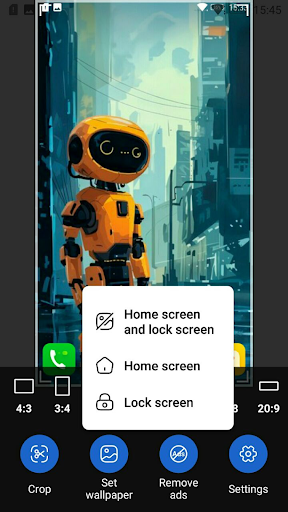
Open in StoreImage to Wallpaper 🖼️ is the easiest way to turn any photo from your gallery into a beautiful wallpaper for your Android home screen or lock screen. Open, edit and apply in just a couple of taps!
🖼️ Set as wallpaper
• Apply to home screen, lock screen, or both at once
• Open images from the gallery or via Share from any other app
• Supported formats: JPG, PNG, WEBP, HEIC, HEIF, GIF
✂️ Crop and rotate
• Free crop with handles and aspect-ratio presets
• Rotate by ±90°, invert, flip horizontally or vertically
• Alternating flip — perfect for tiled wallpapers
📐 Resize and fit
• Match the display width or the full wallpaper width
• Custom wallpaper size from 200 to 8192 pixels
• Exclude status bar and navigation bar height
• Keep original size option
🎨 Effects and filters
• Grayscale, sepia, auto levels
• Brightness, contrast, saturation
• Gamma correction and Gaussian blur
🖼️ Frame (border)
• Solid colors: black, white, gray
• Auto color: light, dark, average from image
• Custom color via color picker
• Another image used as a tiled background
🎯 Alignment
• Move the image left, right, up or down
• Center on the screen
• Tile horizontally or vertically
📚 History
• Quickly return to recently used images
• Delete individual items or clear the entire history
✅ Convenience
• Tabbed editor: Size, Frame, Alignment, Crop, Effects, Image
• Smooth preview with drag and pinch-to-zoom gestures
• Portrait and landscape orientation supported
• Unsaved changes confirmation — never lose your work
• Correct state restore on screen rotation
Image to Wallpaper — turn your favorite photos into beautiful wallpapers in seconds! 📸
🖼️ Set as wallpaper
• Apply to home screen, lock screen, or both at once
• Open images from the gallery or via Share from any other app
• Supported formats: JPG, PNG, WEBP, HEIC, HEIF, GIF
✂️ Crop and rotate
• Free crop with handles and aspect-ratio presets
• Rotate by ±90°, invert, flip horizontally or vertically
• Alternating flip — perfect for tiled wallpapers
📐 Resize and fit
• Match the display width or the full wallpaper width
• Custom wallpaper size from 200 to 8192 pixels
• Exclude status bar and navigation bar height
• Keep original size option
🎨 Effects and filters
• Grayscale, sepia, auto levels
• Brightness, contrast, saturation
• Gamma correction and Gaussian blur
🖼️ Frame (border)
• Solid colors: black, white, gray
• Auto color: light, dark, average from image
• Custom color via color picker
• Another image used as a tiled background
🎯 Alignment
• Move the image left, right, up or down
• Center on the screen
• Tile horizontally or vertically
📚 History
• Quickly return to recently used images
• Delete individual items or clear the entire history
✅ Convenience
• Tabbed editor: Size, Frame, Alignment, Crop, Effects, Image
• Smooth preview with drag and pinch-to-zoom gestures
• Portrait and landscape orientation supported
• Unsaved changes confirmation — never lose your work
• Correct state restore on screen rotation
Image to Wallpaper — turn your favorite photos into beautiful wallpapers in seconds! 📸
Developer email
help.atools@gmail.com
Developer website
https://android-tools.ruReleased
Apr 12, 2020
Current version
1.0.28
Android version
6.0
Reviews & Ratings
2.5
out of 5
5
4
3
2
1
🚫 Very low user satisfaction
368 reviewsScreenshots