SUFLER.PRO
PIXAERO

4.1 stars3,072 reviews100,000+Free
Video Players & EditorsEveryoneVersion VARYUpdated 5/7/2026, 3:52:04 PM
Open in StoreWe've tried to make the process of working with the prompter as convenient as possible.
App Features:
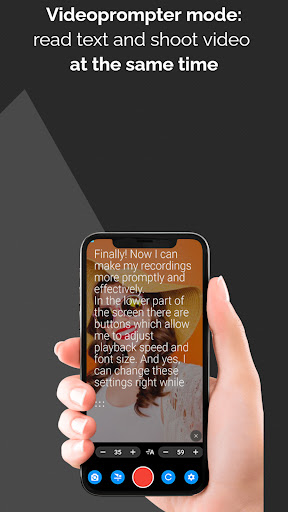
* Read text and record videos from your phone in the video prompter mode.
* Read text and record videos in the mirror prompter mode using a separate camera and a prompter, such as PIXAERO MOBUS.
* Use voice recognition for the mirror prompter mode (requires subscription).
* Connect a remote control or a keyboard using Bluetooth (requires subscription).
* Control text speed and font size settings on the player screen.
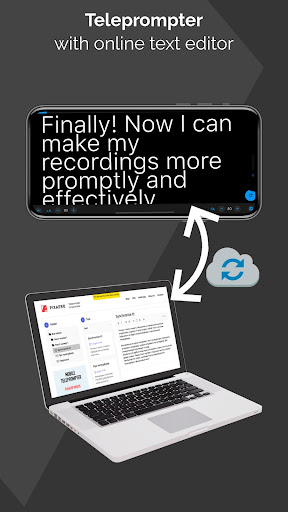
* Make the most of cloud synchronization. Register on SUFLER.PRO website, write and edit your texts on a computer, and all the changes will be automatically synced into the app.
* Customize settings to your liking: scroll speed and font size, start delay, text padding, font height, text alignment. Turn on or off center-focused line, text mirroring or playback loop.
* Tap the screen to pause or resume the text playback.
* Choose between vertical and horizontal screen orientation.
* The app supports Wear OS.
If you have ideas on how to make the application more convenient, write to us: https://pixaero.pro/contacts/
Learn more about the convenience and compactness of PIXAERO MOBUS mobile teleprompter: https://en.pixaero.pro/catalog/teleprompters/teleprompter_pixaero_mobus
Terms of use: https://sufler.pro/terms_of_use_en.pdf
Privacy policy: https://sufler.pro/privacy_policy_en.pdf
App Features:
* Read text and record videos from your phone in the video prompter mode.
* Read text and record videos in the mirror prompter mode using a separate camera and a prompter, such as PIXAERO MOBUS.
* Use voice recognition for the mirror prompter mode (requires subscription).
* Connect a remote control or a keyboard using Bluetooth (requires subscription).
* Control text speed and font size settings on the player screen.
* Make the most of cloud synchronization. Register on SUFLER.PRO website, write and edit your texts on a computer, and all the changes will be automatically synced into the app.
* Customize settings to your liking: scroll speed and font size, start delay, text padding, font height, text alignment. Turn on or off center-focused line, text mirroring or playback loop.
* Tap the screen to pause or resume the text playback.
* Choose between vertical and horizontal screen orientation.
* The app supports Wear OS.
If you have ideas on how to make the application more convenient, write to us: https://pixaero.pro/contacts/
Learn more about the convenience and compactness of PIXAERO MOBUS mobile teleprompter: https://en.pixaero.pro/catalog/teleprompters/teleprompter_pixaero_mobus
Terms of use: https://sufler.pro/terms_of_use_en.pdf
Privacy policy: https://sufler.pro/privacy_policy_en.pdf
Developer email
support@pixaero.pro
Developer website
http://sufler.proReleased
Apr 13, 2018
Current version
VARY
Android version
VARY
Reviews & Ratings
4.1
out of 5
5
4
3
2
1
🟡 Positive overall, with some mixed feedback
3,072 reviewsScreenshots