AI Photo Enhancer - FotoShine
Pixapro.ai

3.6 stars198 reviews100,000+Free
PhotographyEveryoneVersion 1.88.0Updated 10/19/2026, 6:29:59 AM
Open in StoreAI Photo Enhancer: Fotoshine is a simple AI Photo Editor App that lets you effortlessly enhance photo quality, change image backgrounds, and create fun face swaps. Designed for everyday users, editing takes just a few taps to transform ordinary pictures into clean, beautiful photos. From fixing dark shots to organizing custom collages, everything works smoothly in one place.
AI Photo Enhancer: Fotoshine turns everyday photos into clear images. Easily swap faces into fun scenes, build custom AI avatars, or bring black-and-white pictures to life with natural colors using AI Colorize. Removing backgrounds with the Background Remover and putting your favorite images into custom photo collages takes just a few taps.
💫Key Features Of AI Photo Enhancer
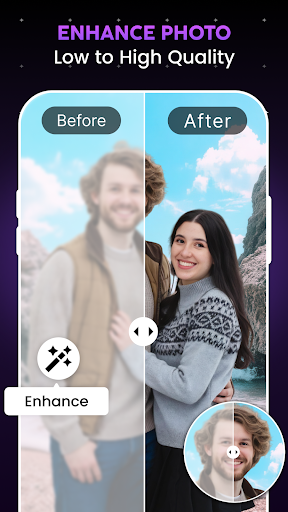
✨Photo Enhancer: Sharpens low-quality pictures and helps improve photo resolution.
✨Face Swap & AI Avatar Maker: Swap your face into creative styles and turn selfies into custom avatars.
✨Photo Colorizer: Colorize black & white photos with realistic tones
✨Background Remover: Remove distracting backgrounds instantly
✨Collage Maker & Photo Frames: Combines multiple pictures into styled grid layouts complete with decorative frames.
🌟Photo Enhancer
Fix your photos in seconds, even if you are dealing with bad lighting or blurry shots. Our AI Photo Enhancer: Fotoshine helps improve photo resolution on low-quality pictures.
The Photo Enhancer enlightens photos to balance dark shadows and effortlessly enhance your photos into a clear AI photo. Using an AI image enhancer makes it easy to enhance photo quality and turn blurry shots into sharp memories.
🌟Face Swap & AI Avatar Maker
Have fun changing up your selfies! With realistic Face Swap, you can easily swap your face into fun new styles and keep up with viral AI Face Swap trends. AI avatar maker helps you create a unique AI Avatar whenever you want to try something new. Whether you want to generate stylized AI avatars, it turns everyday pictures into creative art in seconds.
🌟Photo Colorizer
Bring old memories to life and customize your shots without any hassle. The AI Photo Colorizer lets you colorize black & white photos with realistic tones so anyone can colorize photos naturally.
🌟Background Remover
Erase messy backgrounds with our background remover. You can change image backgrounds to get the look you want. Add a new background in just a few steps.
🌟Collage Maker & Photo Frames
Bring your unique memories together with the Collage Maker & Editor. The Collage Maker feature makes it simple to combine multiple photos into a clean photo collage, whether you are grouping pictures from a trip or a quick outing.
Express your creative side by choosing different grid styles and decorating each piece with custom photo frames. Using this Collage Maker & Editor, you can rearrange your favorite images into a photo collage with ease.
🌟Why Choose AI Photo Enhancer & Editor?
Edit, enhance, and remove backgrounds—all in one place. No special skills are required to change image backgrounds, swap your face, or build a custom photo collage. Using this AI Photo Editor App, everything is simple to use.
🌈Start Editing Today!
Download AI Photo Enhancer: Fotoshine today to enhance photo quality, colorize photos, and create great photos in seconds! Experience what a simple AI image enhancer can do and start transforming your everyday pictures into clean edits right from your phone.
Disclaimer
Results depend on the quality and condition of the original image. Photos with extremely low resolution or severe blur may not be fully restored.
AI Photo Enhancer: Fotoshine turns everyday photos into clear images. Easily swap faces into fun scenes, build custom AI avatars, or bring black-and-white pictures to life with natural colors using AI Colorize. Removing backgrounds with the Background Remover and putting your favorite images into custom photo collages takes just a few taps.
💫Key Features Of AI Photo Enhancer
✨Photo Enhancer: Sharpens low-quality pictures and helps improve photo resolution.
✨Face Swap & AI Avatar Maker: Swap your face into creative styles and turn selfies into custom avatars.
✨Photo Colorizer: Colorize black & white photos with realistic tones
✨Background Remover: Remove distracting backgrounds instantly
✨Collage Maker & Photo Frames: Combines multiple pictures into styled grid layouts complete with decorative frames.
🌟Photo Enhancer
Fix your photos in seconds, even if you are dealing with bad lighting or blurry shots. Our AI Photo Enhancer: Fotoshine helps improve photo resolution on low-quality pictures.
The Photo Enhancer enlightens photos to balance dark shadows and effortlessly enhance your photos into a clear AI photo. Using an AI image enhancer makes it easy to enhance photo quality and turn blurry shots into sharp memories.
🌟Face Swap & AI Avatar Maker
Have fun changing up your selfies! With realistic Face Swap, you can easily swap your face into fun new styles and keep up with viral AI Face Swap trends. AI avatar maker helps you create a unique AI Avatar whenever you want to try something new. Whether you want to generate stylized AI avatars, it turns everyday pictures into creative art in seconds.
🌟Photo Colorizer
Bring old memories to life and customize your shots without any hassle. The AI Photo Colorizer lets you colorize black & white photos with realistic tones so anyone can colorize photos naturally.
🌟Background Remover
Erase messy backgrounds with our background remover. You can change image backgrounds to get the look you want. Add a new background in just a few steps.
🌟Collage Maker & Photo Frames
Bring your unique memories together with the Collage Maker & Editor. The Collage Maker feature makes it simple to combine multiple photos into a clean photo collage, whether you are grouping pictures from a trip or a quick outing.
Express your creative side by choosing different grid styles and decorating each piece with custom photo frames. Using this Collage Maker & Editor, you can rearrange your favorite images into a photo collage with ease.
🌟Why Choose AI Photo Enhancer & Editor?
Edit, enhance, and remove backgrounds—all in one place. No special skills are required to change image backgrounds, swap your face, or build a custom photo collage. Using this AI Photo Editor App, everything is simple to use.
🌈Start Editing Today!
Download AI Photo Enhancer: Fotoshine today to enhance photo quality, colorize photos, and create great photos in seconds! Experience what a simple AI image enhancer can do and start transforming your everyday pictures into clean edits right from your phone.
Disclaimer
Results depend on the quality and condition of the original image. Photos with extremely low resolution or severe blur may not be fully restored.
Developer email
play@pixapro.ai
Developer website
https://nightclocks.blogspot.comReleased
Feb 12, 2025
Current version
1.88.0
Android version
7.0
Reviews & Ratings
3.6
out of 5
5
4
3
2
1
⚠️ Users report mixed experiences
198 reviewsScreenshots