Dog Photo Editor AI Background
Random Step

3.0 stars2,575 reviews100,000+Free
PhotographyEveryoneVersion 1.19.1Updated 3/6/2026, 12:26:47 AM
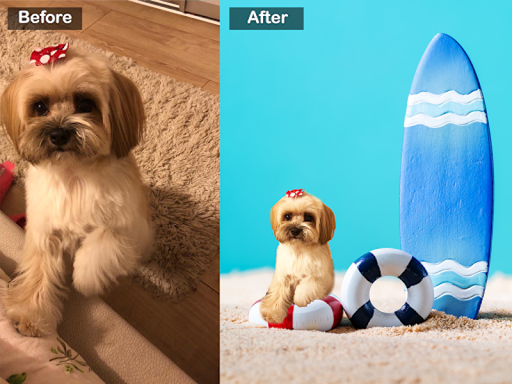
Open in StoreDog Photo Editor is the easiest way to remove backgrounds from your pet photos. Pick any dog photo or puppy picture, and our AI background remover instantly cuts out your pet, removing everything around them. Then replace the background with beautiful scenes, cute wallpapers, and fun photo frames — all designed for pet lovers.
HOW IT WORKS
Background Removal: Our AI-powered pet photo editor automatically detects your dog in any picture and removes the background in seconds. The background eraser uses advanced machine learning to find your pet's edges — ears, tail, paws, and fur — so the cutout looks clean and natural. No manual tracing needed.
Mask Editor: Sometimes the automatic background removal needs a small adjustment. Use the built-in mask editor with brush and eraser tools to refine edges, add back a missing ear or paw, and get a perfect pet cutout. Adjust brush size, hardness, and feathering for precise control over every detail.
REPLACE BACKGROUNDS
Choose from 584+ backgrounds, scenes, and wallpapers to place your dog in a new setting. Want your puppy on the beach, in a garden, on a magazine cover, or in a Christmas scene? Pick from hundreds of options and we add new ones regularly. Backgrounds are designed specifically for pet photos and dog portraits — not generic stock images.
Scenes are multi-layer compositions that place your dog into a complete setting. Backgrounds are single images that let you swap the backdrop while keeping your stickers and edits in place. Switch between them to find the perfect look for your dog photo.
ADD DOG STICKERS
Decorate your pet photo with cute dog stickers — bandanas, hats, caps, bowties, mustaches, sunglasses, birthday accessories, and holiday decorations. With hundreds of stickers to choose from, you can create unique and funny dog pictures for any occasion.
SHARE YOUR PET PHOTOS
Save your edited dog photos and share them directly to Instagram, Facebook, WhatsApp, and other social media. Create dog wallpapers for your phone featuring your own pet. Make birthday cards, holiday greetings, and pet portraits to share with friends and family.
FEATURES
- AI Background Remover: Auto-detect and remove photo backgrounds with one tap
- Background Eraser: Clean removal of backgrounds from pet photos and dog pictures
- Background Changer: Replace backgrounds with 584+ scenes, wallpapers, and photo frames
- Pet Photo Cutout: Cut out your dog, puppy, or pet from any photo automatically
- Mask Editor: Refine edges with brush and eraser for a perfect pet cutout
- Dog Stickers: Hundreds of cute stickers — hats, bandanas, accessories, and more
- Photo Frames: Add decorative frames to your pet photos
- Wallpaper Maker: Create custom dog wallpapers for your phone
- Social Sharing: Share to Instagram, Facebook, WhatsApp and more
- Regular Updates: New backgrounds, stickers, and scenes added constantly
Dog Photo Editor is the background remover made specifically for pet photos. Unlike generic background erasers, our AI is trained to detect dogs, puppies, and pets — so you get better cutouts with cleaner edges around fur, ears, and tails. Whether you are editing dog photos for social media, creating a pet portrait, making a puppy wallpaper, or designing a birthday card for a dog lover — this is the pet photo editor for you.
Download Dog Photo Editor and start creating beautiful photos of your furry friend today.
HOW IT WORKS
Background Removal: Our AI-powered pet photo editor automatically detects your dog in any picture and removes the background in seconds. The background eraser uses advanced machine learning to find your pet's edges — ears, tail, paws, and fur — so the cutout looks clean and natural. No manual tracing needed.
Mask Editor: Sometimes the automatic background removal needs a small adjustment. Use the built-in mask editor with brush and eraser tools to refine edges, add back a missing ear or paw, and get a perfect pet cutout. Adjust brush size, hardness, and feathering for precise control over every detail.
REPLACE BACKGROUNDS
Choose from 584+ backgrounds, scenes, and wallpapers to place your dog in a new setting. Want your puppy on the beach, in a garden, on a magazine cover, or in a Christmas scene? Pick from hundreds of options and we add new ones regularly. Backgrounds are designed specifically for pet photos and dog portraits — not generic stock images.
Scenes are multi-layer compositions that place your dog into a complete setting. Backgrounds are single images that let you swap the backdrop while keeping your stickers and edits in place. Switch between them to find the perfect look for your dog photo.
ADD DOG STICKERS
Decorate your pet photo with cute dog stickers — bandanas, hats, caps, bowties, mustaches, sunglasses, birthday accessories, and holiday decorations. With hundreds of stickers to choose from, you can create unique and funny dog pictures for any occasion.
SHARE YOUR PET PHOTOS
Save your edited dog photos and share them directly to Instagram, Facebook, WhatsApp, and other social media. Create dog wallpapers for your phone featuring your own pet. Make birthday cards, holiday greetings, and pet portraits to share with friends and family.
FEATURES
- AI Background Remover: Auto-detect and remove photo backgrounds with one tap
- Background Eraser: Clean removal of backgrounds from pet photos and dog pictures
- Background Changer: Replace backgrounds with 584+ scenes, wallpapers, and photo frames
- Pet Photo Cutout: Cut out your dog, puppy, or pet from any photo automatically
- Mask Editor: Refine edges with brush and eraser for a perfect pet cutout
- Dog Stickers: Hundreds of cute stickers — hats, bandanas, accessories, and more
- Photo Frames: Add decorative frames to your pet photos
- Wallpaper Maker: Create custom dog wallpapers for your phone
- Social Sharing: Share to Instagram, Facebook, WhatsApp and more
- Regular Updates: New backgrounds, stickers, and scenes added constantly
Dog Photo Editor is the background remover made specifically for pet photos. Unlike generic background erasers, our AI is trained to detect dogs, puppies, and pets — so you get better cutouts with cleaner edges around fur, ears, and tails. Whether you are editing dog photos for social media, creating a pet portrait, making a puppy wallpaper, or designing a birthday card for a dog lover — this is the pet photo editor for you.
Download Dog Photo Editor and start creating beautiful photos of your furry friend today.
Developer email
contact@randomsteps.com
Developer website
https://randomsteps.com/Released
May 13, 2021
Current version
1.19.1
Android version
8.0
Reviews & Ratings
3.0
out of 5
5
4
3
2
1
😕 Lower user ratings overall
2,575 reviewsScreenshots