Membantu
Membantu

Introducing Membantu – more and better sleep🌙✨
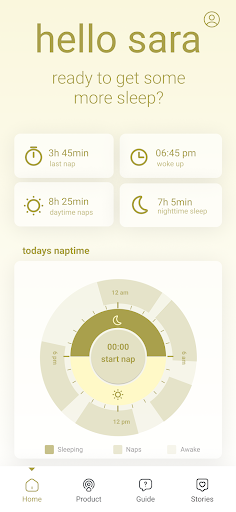
Struggling with ensuring your baby gets a peaceful sleep? Look no further! With the Membantu app, and our innovative Cradle Bouncer, developed by two dedicated moms, you can provide your baby with a nice sleep experience while you get time to reload.
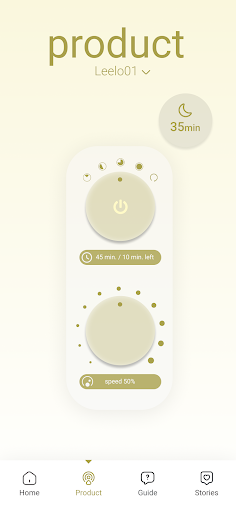
🌟 Remote Serenity at Your Fingertips: Imagine fine-tuning your baby’s sleep environment from the comfort of your couch! Membantu lets you customize our smart Cradle Bouncer, ensuring a deep and serene sleep for your little one. Relax as you effortlessly control and personalize the sleep settings.
🔍 Troubleshooting Assistance: Uncertain about setting up the Cradle Bouncer? Membantu has you covered! Our app provides step-by-step troubleshooting guides for seamless setup, ensuring you have the peace of mind that your baby's sleep is optimized to perfection.
🌙 Sleep Insights & Tailored Tips: Whether you're a rookie parent or a seasoned pro, Membantu offers a goldmine of expert tips to establish healthy sleep patterns. Access practical advice for challenges like colic or restlessness – all available whenever you need them.
🚀 Shaping Sleep's Future: Membantu is more than an app – it's your partner in the sleep journey. Our dedicated team, led by two visionary moms, consistently crafts new versions and updates to empower your parenting experience, providing you with all the tools you need for your baby's peaceful sleep. We are always open to new suggestions, so please do not hesitate to contact us, if you have a brilliant idea, that could help other sleepy babies and parents.
Download Membantu today and experience the blissful difference our Cradle Bouncer can make. 💤👶
Struggling with ensuring your baby gets a peaceful sleep? Look no further! With the Membantu app, and our innovative Cradle Bouncer, developed by two dedicated moms, you can provide your baby with a nice sleep experience while you get time to reload.
🌟 Remote Serenity at Your Fingertips: Imagine fine-tuning your baby’s sleep environment from the comfort of your couch! Membantu lets you customize our smart Cradle Bouncer, ensuring a deep and serene sleep for your little one. Relax as you effortlessly control and personalize the sleep settings.
🔍 Troubleshooting Assistance: Uncertain about setting up the Cradle Bouncer? Membantu has you covered! Our app provides step-by-step troubleshooting guides for seamless setup, ensuring you have the peace of mind that your baby's sleep is optimized to perfection.
🌙 Sleep Insights & Tailored Tips: Whether you're a rookie parent or a seasoned pro, Membantu offers a goldmine of expert tips to establish healthy sleep patterns. Access practical advice for challenges like colic or restlessness – all available whenever you need them.
🚀 Shaping Sleep's Future: Membantu is more than an app – it's your partner in the sleep journey. Our dedicated team, led by two visionary moms, consistently crafts new versions and updates to empower your parenting experience, providing you with all the tools you need for your baby's peaceful sleep. We are always open to new suggestions, so please do not hesitate to contact us, if you have a brilliant idea, that could help other sleepy babies and parents.
Download Membantu today and experience the blissful difference our Cradle Bouncer can make. 💤👶
Developer email
app@membantustore.com
Developer website
https://membantustore.com/Released
Sep 6, 2023
Current version
0.0.140
Android version
6.0
Screenshots