スタンプ画像作っちゃお - LINEスタンプ用画像作成
KUMAZAWA SOFT

■ Easily create LINE sticker images from photos and text!
"Let's Make Stickers" is an app that automatically generates original character sticker images using AI.
You can create characters based on your favorite photos, or even just from a description like "a fluffy white cat."
The AI handles poses and dialogue, generating 8 to 40 images at once. You can export them in a format directly usable for LINE Creators Market applications.
■ Recommended for:
・Those who want to turn photos of pets or children into stickers
・Those who can't draw but want to create original stickers
・Those who want to create stickers only for family and friends
・Those who want to try selling LINE stickers as a creator
■ Main Features
【Base Character Creation】
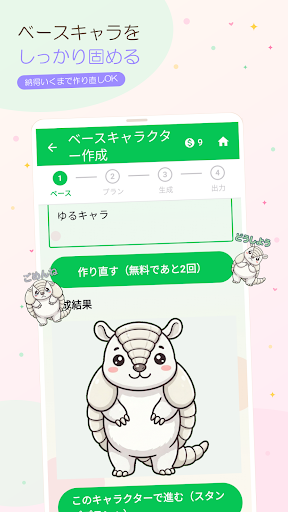
Three methods: "From a photo," "From a description," and "Use your existing image."
You can also specify the atmosphere and style (e.g., a loose, watercolor-style deformation).
You can revise until you're satisfied (up to 2 revisions per project for free).
[Stamp Plan]
Choose from 8/16/24/32/40 stamps. The AI will suggest poses and dialogue, so you only need to edit the parts you want. You can also specify the position and color of the text.
[Batch Generation]
Automatically generates stamps one by one in sequence. You can pause and resume while monitoring the progress, and you can even select and regenerate only the stamp you don't like.
[Output File for Application]
Exports transparent PNGs of the main image (240x240), tab image (96x74), and stamp image (maximum 370x320) in LINE's standard size. Save them as a ZIP file, and all you have to do is upload them to LINE Creators Market.
■Easy 4-Step Usage
1. Attach a photo or enter a character description.
2. Check the created base character (you can remake it).
3. Select the number of images and let the AI handle the pose and dialogue.
4. Generate them all at once and save the application file.
■Pricing
Credits are used to generate images.
• 10 credits are given free of charge to first-time users.
• 1 credit is required per stamp image.
• Credits can be purchased anytime within the app.
Since you sign in with your Google account, your credits and ongoing projects will be carried over even if you change devices.
■Notes
• This app is for creating "images" for stamps. To sell and use them as LINE stamps, you will need to register as a creator on the LINE Creators Market and go through the application and review process separately.
• We do not guarantee that you will pass the review. Please check LINE's guidelines before applying.
* Images are created using AI, so there may be variations in the final result.
* Do not use photos of other people or images that may infringe on copyright or portrait rights.
* "LINE" and "LINE Creators Market" are trademarks of LINE Yahoo! Japan Corporation.
This app is not an official app provided by LINE Yahoo! Japan Corporation.
"Let's Make Stickers" is an app that automatically generates original character sticker images using AI.
You can create characters based on your favorite photos, or even just from a description like "a fluffy white cat."
The AI handles poses and dialogue, generating 8 to 40 images at once. You can export them in a format directly usable for LINE Creators Market applications.
■ Recommended for:
・Those who want to turn photos of pets or children into stickers
・Those who can't draw but want to create original stickers
・Those who want to create stickers only for family and friends
・Those who want to try selling LINE stickers as a creator
■ Main Features
【Base Character Creation】
Three methods: "From a photo," "From a description," and "Use your existing image."
You can also specify the atmosphere and style (e.g., a loose, watercolor-style deformation).
You can revise until you're satisfied (up to 2 revisions per project for free).
[Stamp Plan]
Choose from 8/16/24/32/40 stamps. The AI will suggest poses and dialogue, so you only need to edit the parts you want. You can also specify the position and color of the text.
[Batch Generation]
Automatically generates stamps one by one in sequence. You can pause and resume while monitoring the progress, and you can even select and regenerate only the stamp you don't like.
[Output File for Application]
Exports transparent PNGs of the main image (240x240), tab image (96x74), and stamp image (maximum 370x320) in LINE's standard size. Save them as a ZIP file, and all you have to do is upload them to LINE Creators Market.
■Easy 4-Step Usage
1. Attach a photo or enter a character description.
2. Check the created base character (you can remake it).
3. Select the number of images and let the AI handle the pose and dialogue.
4. Generate them all at once and save the application file.
■Pricing
Credits are used to generate images.
• 10 credits are given free of charge to first-time users.
• 1 credit is required per stamp image.
• Credits can be purchased anytime within the app.
Since you sign in with your Google account, your credits and ongoing projects will be carried over even if you change devices.
■Notes
• This app is for creating "images" for stamps. To sell and use them as LINE stamps, you will need to register as a creator on the LINE Creators Market and go through the application and review process separately.
• We do not guarantee that you will pass the review. Please check LINE's guidelines before applying.
* Images are created using AI, so there may be variations in the final result.
* Do not use photos of other people or images that may infringe on copyright or portrait rights.
* "LINE" and "LINE Creators Market" are trademarks of LINE Yahoo! Japan Corporation.
This app is not an official app provided by LINE Yahoo! Japan Corporation.
Developer email
linestampchao@gmail.com
Released
Jul 23, 2026
Current version
1.0.36
Android version
7.0
Screenshots