リーダーズスペシャル for Android
LogoVista

<================================
The ultimate English-Japanese dictionary + an essential English-Japanese dictionary for English professionals!
If you want to "read" English, this is the app for you!
<================================
■ Dictionary Content Guide ■
・This dictionary app combines "Readers English-Japanese Dictionary 3rd Edition" and "Readers Plus."
・"Readers English-Japanese Dictionary 3rd Edition" is an essential English-Japanese dictionary for students and working adults learning English, as well as for professionals and translators who use English.
・Includes 280,000 entries (including headwords, derived words, sub-headwords, and idioms).
* Accurately reflects the vocabulary and usage of modern English, including a wide range of terms from colloquialisms and slang to specialized terminology in various fields.
* Focuses on information for reading, compactly containing a rich vocabulary that surpasses even large dictionaries.
* Includes approximately 15,000 audio data recorded by native speakers.
* 'Readers Plus' is an essential dictionary for translators, supplementing the Readers English-Japanese Dictionary.
* Approximately 190,000 headwords. Includes approximately 260,000 main entries, sub-entries, and idioms.
* When used in conjunction with the Readers English-Japanese Dictionary, it creates the largest English-Japanese environment with approximately 470,000 words.
* In addition to commonly used English-Japanese, it includes colloquialisms, slang, vulgar language, euphemisms, English from around the world, personal and fictional names from around the world, place names and geographical information, and titles of works.
* Each entry includes common English words, proper nouns, prefixes, suffixes, linking words, abbreviations, symbols, loanwords, and foreign phrases and quotations.
* It includes a wealth of information not typically found in standard English-Japanese dictionaries.
■ Enhance the dictionary content with app features! ■
* Two dictionaries in one! Keyword search results are sorted alphabetically without distinguishing between the two dictionaries.
Furthermore, an icon is displayed to indicate which dictionary the entry belongs to.
* Reverse search information is included, allowing you to search from Japanese and katakana words!
In addition to the standard English-to-Japanese search style, you can now search from Japanese to English.
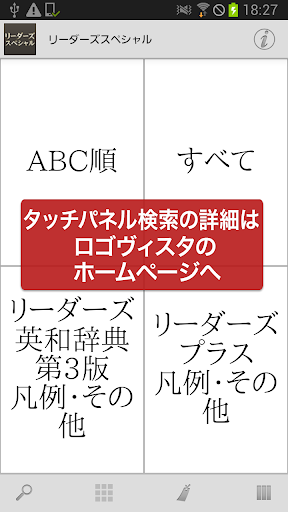
* Scrollable display of headwords! A "touch panel search" function is included.
The panel text also displays an icon indicating which dictionary the entry belongs to.
* You can register separate bookmarks for example sentences within the entry text, separate from the entry entries themselves.
■ Comprehensive Search Function! ■
- Automatic search with each keyword entered. Incremental search instantly updates search results.
- Voice input is also supported for keyword input.
- Detailed keyword matching conditions can be specified, such as "prefix match" and "suffix match." Instant re-searching occurs when conditions are changed.
- "Full-text search" is available for almost all dictionaries, allowing you to search the text of all entries.
- "In-text search" is available to search the content of the dictionary entry you are currently reading.
- The history of entered keywords and displayed entries is automatically recorded. Re-entering and re-displaying is easy.
■ Sharing with Other Apps Made Possible by the App! ■
- Supports the basic Android operation "Share"! You can have the dictionary browser search text selected in another app.
- You can freely specify the dictionary to search using "Share" from your existing dictionary apps.
- Conversely, you can use the text of dictionary entries to perform web searches. Of course, you can also search within the dictionary app.
■ Customize text for easier reading! ■
- You can finely adjust the font size of dictionary entries.
- A dark theme display mode (black background + white text) is also available to reduce eye strain.
- Of course, you can also change the item size using touch controls.
■ Bookmark important information! ■
- You can bookmark dictionary entries at any time.
- Bookmarks can be categorized into 10 color patterns, and memo text can be set.
- The bookmark list screen includes a filter function to display only bookmarks of a specific color.
- The display order on the bookmark list screen can be sorted by registration date, item order, etc.
■ Powerful collaboration between dictionary series! ■
- You can freely group dictionary series together and search them all at once.
- In the search results list of group dictionaries, you can jump to the beginning of each member dictionary.
- Duplicates are OK! You can register one dictionary as a member in various groups simultaneously.
* Bookmarks in group dictionaries can, of course, be displayed together.
* You can quickly search other dictionaries using the text of the displayed dictionary entry.
■ Convenient additional and extended features are also included! ■
* You can have the text of dictionary entries read aloud using synthesized speech.
■ No internet connection required after setup! ■
* All data required by the dictionary is stored within the app.
* After installation and setup, it can be used completely offline.
■ Update History [Latest Version 2.01] ■
* The acquisition and management of dictionary data has been significantly revised.
* The auxiliary (dictionary browser) app used in conjunction with the dictionary app has been switched to a new, separate app.
■ Regarding the handwriting input function ■
* The handwriting input function "Rakuhira," which was built into the dictionary browser app,
is no longer available due to development reasons at the function provider.
We sincerely apologize, but please consider using an alternative app such as "GBoard-Google Keyboard."
■ Notes ■
・To use this app, a free auxiliary app is required for searching and displaying entries in the LogoVista Electronic Dictionary series.
If the auxiliary app is not detected when you launch the app, you will be given the option to go to Google Play.
Please obtain "LogoVista Electronic Dictionary Browser Ver.2 for Android" from Google Play.
・To use the text-to-speech function, you will need to install the free "Google Text-to-Speech" app separately.
・If you have any questions about our products, please contact us at the address below.
android.dev@logovista.co.jp
■ Data Saving to External Storage (External SD Card) ■
・Some of the dictionary app data can be saved to external storage (external SD card).
*There are conditions and notes regarding use. For details, please refer to Q8 on our Q&A page below.
https://www.logovista.co.jp/LVERP/information/support/user_qa/android/top.html#Q8
■ Operating Environment ■
・Android OS 7.0 to 13.0
*The operating environment is for the latest publicly available version. Conditions may differ if you are using an older version.
■ Chromebook Compatible Models
To use the LogoVista Electronic Dictionary Series for Android app on a Chromebook, a Chromebook compatible with Google Play (Android apps) is required.
■ Not Supported ■
・Android OS 1.0 to 6.0.1
・Android devices with CPUs other than ARM-based processors
・"Go Edition" versions of each Android OS
■ Developer/Distributor ■
LogoVista Co., Ltd. https://www.logovista.co.jp/
■ Content Publisher ■
Kenkyusha Ltd.
The ultimate English-Japanese dictionary + an essential English-Japanese dictionary for English professionals!
If you want to "read" English, this is the app for you!
<================================
■ Dictionary Content Guide ■
・This dictionary app combines "Readers English-Japanese Dictionary 3rd Edition" and "Readers Plus."
・"Readers English-Japanese Dictionary 3rd Edition" is an essential English-Japanese dictionary for students and working adults learning English, as well as for professionals and translators who use English.
・Includes 280,000 entries (including headwords, derived words, sub-headwords, and idioms).
* Accurately reflects the vocabulary and usage of modern English, including a wide range of terms from colloquialisms and slang to specialized terminology in various fields.
* Focuses on information for reading, compactly containing a rich vocabulary that surpasses even large dictionaries.
* Includes approximately 15,000 audio data recorded by native speakers.
* 'Readers Plus' is an essential dictionary for translators, supplementing the Readers English-Japanese Dictionary.
* Approximately 190,000 headwords. Includes approximately 260,000 main entries, sub-entries, and idioms.
* When used in conjunction with the Readers English-Japanese Dictionary, it creates the largest English-Japanese environment with approximately 470,000 words.
* In addition to commonly used English-Japanese, it includes colloquialisms, slang, vulgar language, euphemisms, English from around the world, personal and fictional names from around the world, place names and geographical information, and titles of works.
* Each entry includes common English words, proper nouns, prefixes, suffixes, linking words, abbreviations, symbols, loanwords, and foreign phrases and quotations.
* It includes a wealth of information not typically found in standard English-Japanese dictionaries.
■ Enhance the dictionary content with app features! ■
* Two dictionaries in one! Keyword search results are sorted alphabetically without distinguishing between the two dictionaries.
Furthermore, an icon is displayed to indicate which dictionary the entry belongs to.
* Reverse search information is included, allowing you to search from Japanese and katakana words!
In addition to the standard English-to-Japanese search style, you can now search from Japanese to English.
* Scrollable display of headwords! A "touch panel search" function is included.
The panel text also displays an icon indicating which dictionary the entry belongs to.
* You can register separate bookmarks for example sentences within the entry text, separate from the entry entries themselves.
■ Comprehensive Search Function! ■
- Automatic search with each keyword entered. Incremental search instantly updates search results.
- Voice input is also supported for keyword input.
- Detailed keyword matching conditions can be specified, such as "prefix match" and "suffix match." Instant re-searching occurs when conditions are changed.
- "Full-text search" is available for almost all dictionaries, allowing you to search the text of all entries.
- "In-text search" is available to search the content of the dictionary entry you are currently reading.
- The history of entered keywords and displayed entries is automatically recorded. Re-entering and re-displaying is easy.
■ Sharing with Other Apps Made Possible by the App! ■
- Supports the basic Android operation "Share"! You can have the dictionary browser search text selected in another app.
- You can freely specify the dictionary to search using "Share" from your existing dictionary apps.
- Conversely, you can use the text of dictionary entries to perform web searches. Of course, you can also search within the dictionary app.
■ Customize text for easier reading! ■
- You can finely adjust the font size of dictionary entries.
- A dark theme display mode (black background + white text) is also available to reduce eye strain.
- Of course, you can also change the item size using touch controls.
■ Bookmark important information! ■
- You can bookmark dictionary entries at any time.
- Bookmarks can be categorized into 10 color patterns, and memo text can be set.
- The bookmark list screen includes a filter function to display only bookmarks of a specific color.
- The display order on the bookmark list screen can be sorted by registration date, item order, etc.
■ Powerful collaboration between dictionary series! ■
- You can freely group dictionary series together and search them all at once.
- In the search results list of group dictionaries, you can jump to the beginning of each member dictionary.
- Duplicates are OK! You can register one dictionary as a member in various groups simultaneously.
* Bookmarks in group dictionaries can, of course, be displayed together.
* You can quickly search other dictionaries using the text of the displayed dictionary entry.
■ Convenient additional and extended features are also included! ■
* You can have the text of dictionary entries read aloud using synthesized speech.
■ No internet connection required after setup! ■
* All data required by the dictionary is stored within the app.
* After installation and setup, it can be used completely offline.
■ Update History [Latest Version 2.01] ■
* The acquisition and management of dictionary data has been significantly revised.
* The auxiliary (dictionary browser) app used in conjunction with the dictionary app has been switched to a new, separate app.
■ Regarding the handwriting input function ■
* The handwriting input function "Rakuhira," which was built into the dictionary browser app,
is no longer available due to development reasons at the function provider.
We sincerely apologize, but please consider using an alternative app such as "GBoard-Google Keyboard."
■ Notes ■
・To use this app, a free auxiliary app is required for searching and displaying entries in the LogoVista Electronic Dictionary series.
If the auxiliary app is not detected when you launch the app, you will be given the option to go to Google Play.
Please obtain "LogoVista Electronic Dictionary Browser Ver.2 for Android" from Google Play.
・To use the text-to-speech function, you will need to install the free "Google Text-to-Speech" app separately.
・If you have any questions about our products, please contact us at the address below.
android.dev@logovista.co.jp
■ Data Saving to External Storage (External SD Card) ■
・Some of the dictionary app data can be saved to external storage (external SD card).
*There are conditions and notes regarding use. For details, please refer to Q8 on our Q&A page below.
https://www.logovista.co.jp/LVERP/information/support/user_qa/android/top.html#Q8
■ Operating Environment ■
・Android OS 7.0 to 13.0
*The operating environment is for the latest publicly available version. Conditions may differ if you are using an older version.
■ Chromebook Compatible Models
To use the LogoVista Electronic Dictionary Series for Android app on a Chromebook, a Chromebook compatible with Google Play (Android apps) is required.
■ Not Supported ■
・Android OS 1.0 to 6.0.1
・Android devices with CPUs other than ARM-based processors
・"Go Edition" versions of each Android OS
■ Developer/Distributor ■
LogoVista Co., Ltd. https://www.logovista.co.jp/
■ Content Publisher ■
Kenkyusha Ltd.
Developer email
android.dev@logovista.co.jp
Developer website
https://www.logovista.co.jp/Released
Jun 17, 2014
Current version
3.02
Android version
7.0
Screenshots