新フランス文法事典
LogoVista

■ Dictionary Content Guide ■
Since its publication in 1955, it has been loved by both learners and researchers, and was further enhanced with a major revision in 2002. The phrase "When in Trouble, Rely on Asakura Grammar" is well-known to those in the know; it's a lifesaver when learners and researchers encounter grammatical difficulties, and it's no exaggeration to say that it answers any grammatical question—an indispensable dictionary for learning French.
■ Enhance the Dictionary Content Features with App Functionality! ■
・Takes full advantage of the app version, including link jump functions to related items.
・You can bookmark not only headwords but also sections of entries such as "Examples."
■ Comprehensive Search Function! ■
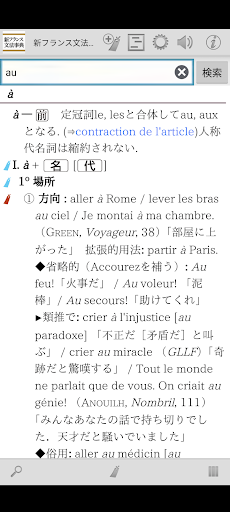
・Automatic search each time you enter a keyword. "Incremental Search" instantly updates search results.
・Of course, voice input is also supported for search keywords.
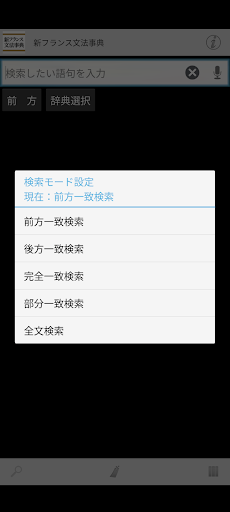
・You can specify detailed search keyword matching conditions, such as "prefix match" and "suffix match." Instantly re-searches when conditions are changed.
* Full-text search is available for almost all dictionaries, allowing you to search the text of all entries.
* In-text search is available, allowing you to search the content of the dictionary entry you are currently reading.
* Automatically records the history of entered keywords and displayed entries. Re-entering and re-displaying is easy.
■ Sharing with other apps, possible only with an app! ■
* Supports the basic Android operation "Share"! You can have the dictionary browser search text selected in another app.
* You can freely specify the dictionary to search using "Share" from your existing dictionary apps.
* Conversely, you can use the text of dictionary entries to perform web searches. Of course, you can also search within the dictionary app.
■ Customize text for easier reading! ■
* The font size of dictionary entry text can be finely adjusted.
* A dark theme display mode (black background + white text) is also included to reduce eye strain.
* Of course, you can also change the item size with touch operation.
■ Bookmark Important Information! ■
- You can bookmark dictionary entries at any time.
- Bookmarks can be categorized into 10 color patterns and have memo text.
- The bookmark list screen includes a filter function to display only bookmarks of a specific color.
- The display order on the bookmark list screen can be sorted by registration date, entry order, etc.
■ Powerful Integration Between Dictionary Series! ■
- You can freely group dictionary series together and search them all at once.
- The search results list for group dictionaries allows you to jump to the beginning of each member dictionary.
- Duplicates are OK! You can register one dictionary as a member in various groups simultaneously.
- Bookmarks in group dictionaries can, of course, be displayed together.
- You can use the text of the displayed dictionary entry to quickly search in another dictionary.
■ Convenient Additional and Extended Features Included! ■
- You can have the text of dictionary entries read aloud using synthesized speech.
■ No Internet Connection Required After Setup! ■ All data required by the dictionary is stored within the app.
・After installation and preparation are complete, it can be used completely offline.
■ Update History [Latest Version 1.01] ■
・The app has been released.
■ Notes ■
・To use this app, a free auxiliary app for searching and displaying the LogoVista electronic dictionary series is required.
If the auxiliary app is not detected when you launch the app, you will be given the option to go to Google Play.
Please obtain "LogoVista Electronic Dictionary Browser Ver.2 for Android" from Google Play.
・To use the text-to-speech function, you will need to install the free "Google Text-to-Speech" app separately.
・If you have any questions about our products, please contact us at the address below.
android.dev@logovista.co.jp
■ Data Saving to External Storage (External SD Card) ■
・Some of the dictionary app data can be saved to external storage (external SD card).
*There are conditions and precautions for use. For details, please check Q8 on our Q&A page below.
https://www.logovista.co.jp/LVERP/information/support/user_qa/android/top.html#Q8
■ Operating Environment ■
・Android OS 7.0 to 13.0
*The operating environment is for the latest publicly available version. Conditions may differ if you are using an older version.
■ Chromebook Compatible Models
To use the LogoVista Electronic Dictionary Series for Android app on a Chromebook, a Chromebook compatible with Google Play (Android apps) is required.
■ Not Supported ■
• Android OS 1.0 to 6.0.1
• Android devices with non-ARM-based CPUs
• "Go Edition" versions of each Android OS
■ Developer/Distributor ■
Logovista Co., Ltd. https://www.logovista.co.jp/
■ Content Publisher ■
Hakusuisha Co., Ltd.
Developer email
android.dev@logovista.co.jp
Developer website
https://www.logovista.co.jpReleased
Apr 22, 2024
Current version
1.02
Android version
7.0
Screenshots