Gガイド テレビ番組表 テレビ局公認タレント出演情報満載
IPG Inc

0.0 stars1,000,000+Free
Video Players & EditorsEveryoneVersion 12.0.1Updated 4/23/2026, 6:36:41 AM
Open in StoreThis app does not integrate with the "One-Seg/TV" app.
Viewing and recording reservations for the "One-Seg/TV" app are not supported from this app.
If you encounter any problems, please contact us at "help-cfree@ipg.jp".
[Update History]
[2026/3/10] "Broadcast Programs," "Streaming Content," and "Talent"—Simultaneous Search with a Single Keyword! Significantly Updated Search Function
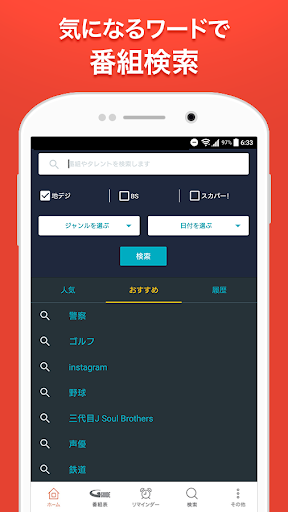
Keyword search now allows simultaneous searching of "Broadcast Programs," "Talent," and "Streaming Content" across services.
Previously, only results for broadcast programs matching the search keyword were displayed. Now, when a search keyword is found, three tabs—"Broadcast Programs," "Talent," and "Streaming Content"—are displayed.
This allows you to view search results for "Broadcast Programs," "Talent," and the newly added "Streaming Content" by switching between tabs with a single keyword search.
[Features]
☆ User-friendly official program guide with images and videos.
☆Compatible with CS (SKY PerfecTV!/SKY PerfecTV! Premium), BS4K/8K, and radiko!
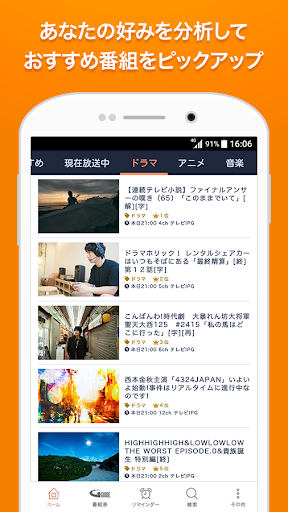
☆Check out featured programs and popular talents, and search conveniently!
☆Remote recording reservation via linkage with recording device
*Limited to compatible recording devices (Panasonic DIGA).
【Frequently Asked Questions】
Q. Broadcast stations that I have unchecked in "Display Channel Settings" are displayed in "Favorites"
A. "Display Channel Settings" are only reflected in "Program Guide," "Custom Program Guide," and "Search," not in "Favorites."
For channels displayed in "Favorites," you can exclude them by unchecking each broadcast wave in "Other" > "Favorite Target Broadcast Waves." * "Favorite Target Broadcast Waves" cannot be set for individual broadcast stations.
Q. BS and CS programs are displayed in "Favorites" and I receive notifications
A. You can set the display and notifications for programs and talents registered in "Favorites" on a per-broadcast wave basis.
You can exclude specific broadcast channels by tapping the gear icon in the upper left corner of "Favorites" or by unchecking each broadcast channel under "Other" > "Favorite Broadcast Channels".
Unchecking a broadcast channel will remove its programs from the "Favorites" list.
Furthermore, you will no longer receive pre-broadcast notifications (push notifications) for programs on unchecked broadcast channels.
Please adjust the settings according to your preferences.
Q. How do I stop push notifications for "Today's TV Listings"?
A. Please adjust the settings using the following method:
① Launch the TV guide app
② Tap "Other" in the bottom menu
③ Tap "Push Notifications"
④ Tap "Today's TV Listings" within "Push Notifications"
⑤ Turn off the "ON" switch
Q. Which recording devices support remote recording?
A. Only Panasonic recording devices are supported.
Please check the list of compatible models on the website below.
https://ggm.bangumi.org/web/v6/forward.action?name=remote_recording
Q. I can't connect with One-Seg/Full-Seg.
A. This app does not have a function to connect with the "One-Seg/TV app."
Please note that you cannot view or schedule recordings using the "One-Seg/TV app" installed on your device.
Please use the "One-Seg/TV app" on your device to view and schedule recordings.
*Depending on your device, the "One-Seg/TV app" may not be installed, or some models may not have a recording function. Please check your device's instruction manual for information on viewing and recording functions.
[Function Overview]
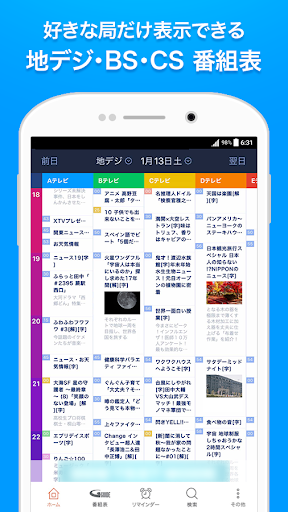
* View TV program listings for terrestrial/BS/CS (SKY PerfecTV!/SKY PerfecTV! Premium)/BS4K/8K/radiko
* Accurate information using "SI-EPG," a program guide operated by broadcasting stations
* Supports broadcasting stations throughout Japan and in various regions
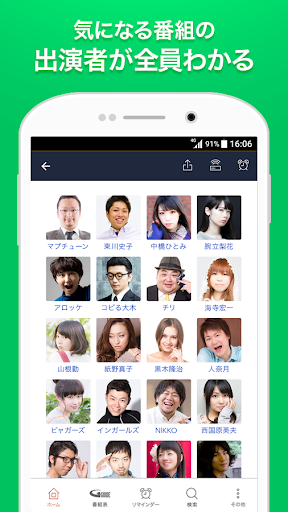
* Search by talent profile and talent
* Check programs featuring talents from their profiles
* Search programs by keyword
* Reminder function that notifies you just before broadcast
* Find programs from official SNS accounts and official videos
* Post to SNS (LINE, X, Facebook, etc.) from program details
* Remote recording reservation
* Only Panasonic is supported.
Please check the list of compatible models on the website below. https://ggm.bangumi.org/web/v6/forward.action?name=remote_recording
===============================================================================
[Past Update History]
[2023/6/15] TELASA, FOD, and Hulu integration has started in all regions.
This service places a link to the video streaming service distributing the program in question within the program guide after the broadcast ends.
In addition, the following functions have been added from Ver. 10.11.0:
・Support for past terrestrial and BS program guides (up to one week prior) has been added in all regions.
・TVer and Paravi integration has started in all regions.
[Supported OS]
Android version 6.0 or later
[Notes]
・Separate packet communication charges will apply when using this application (including application download/version upgrade, etc.).
・Packet communication charges may be high. For your peace of mind, please use a flat-rate data plan or Wi-Fi.
* This app does not integrate with the "One-Seg/TV" app. Viewing and recording reservations for the "One-Seg/TV" app from this app are not supported.
* This app does not support TV remote control functionality.
Viewing and recording reservations for the "One-Seg/TV" app are not supported from this app.
If you encounter any problems, please contact us at "help-cfree@ipg.jp".
[Update History]
[2026/3/10] "Broadcast Programs," "Streaming Content," and "Talent"—Simultaneous Search with a Single Keyword! Significantly Updated Search Function
Keyword search now allows simultaneous searching of "Broadcast Programs," "Talent," and "Streaming Content" across services.
Previously, only results for broadcast programs matching the search keyword were displayed. Now, when a search keyword is found, three tabs—"Broadcast Programs," "Talent," and "Streaming Content"—are displayed.
This allows you to view search results for "Broadcast Programs," "Talent," and the newly added "Streaming Content" by switching between tabs with a single keyword search.
[Features]
☆ User-friendly official program guide with images and videos.
☆Compatible with CS (SKY PerfecTV!/SKY PerfecTV! Premium), BS4K/8K, and radiko!
☆Check out featured programs and popular talents, and search conveniently!
☆Remote recording reservation via linkage with recording device
*Limited to compatible recording devices (Panasonic DIGA).
【Frequently Asked Questions】
Q. Broadcast stations that I have unchecked in "Display Channel Settings" are displayed in "Favorites"
A. "Display Channel Settings" are only reflected in "Program Guide," "Custom Program Guide," and "Search," not in "Favorites."
For channels displayed in "Favorites," you can exclude them by unchecking each broadcast wave in "Other" > "Favorite Target Broadcast Waves." * "Favorite Target Broadcast Waves" cannot be set for individual broadcast stations.
Q. BS and CS programs are displayed in "Favorites" and I receive notifications
A. You can set the display and notifications for programs and talents registered in "Favorites" on a per-broadcast wave basis.
You can exclude specific broadcast channels by tapping the gear icon in the upper left corner of "Favorites" or by unchecking each broadcast channel under "Other" > "Favorite Broadcast Channels".
Unchecking a broadcast channel will remove its programs from the "Favorites" list.
Furthermore, you will no longer receive pre-broadcast notifications (push notifications) for programs on unchecked broadcast channels.
Please adjust the settings according to your preferences.
Q. How do I stop push notifications for "Today's TV Listings"?
A. Please adjust the settings using the following method:
① Launch the TV guide app
② Tap "Other" in the bottom menu
③ Tap "Push Notifications"
④ Tap "Today's TV Listings" within "Push Notifications"
⑤ Turn off the "ON" switch
Q. Which recording devices support remote recording?
A. Only Panasonic recording devices are supported.
Please check the list of compatible models on the website below.
https://ggm.bangumi.org/web/v6/forward.action?name=remote_recording
Q. I can't connect with One-Seg/Full-Seg.
A. This app does not have a function to connect with the "One-Seg/TV app."
Please note that you cannot view or schedule recordings using the "One-Seg/TV app" installed on your device.
Please use the "One-Seg/TV app" on your device to view and schedule recordings.
*Depending on your device, the "One-Seg/TV app" may not be installed, or some models may not have a recording function. Please check your device's instruction manual for information on viewing and recording functions.
[Function Overview]
* View TV program listings for terrestrial/BS/CS (SKY PerfecTV!/SKY PerfecTV! Premium)/BS4K/8K/radiko
* Accurate information using "SI-EPG," a program guide operated by broadcasting stations
* Supports broadcasting stations throughout Japan and in various regions
* Search by talent profile and talent
* Check programs featuring talents from their profiles
* Search programs by keyword
* Reminder function that notifies you just before broadcast
* Find programs from official SNS accounts and official videos
* Post to SNS (LINE, X, Facebook, etc.) from program details
* Remote recording reservation
* Only Panasonic is supported.
Please check the list of compatible models on the website below. https://ggm.bangumi.org/web/v6/forward.action?name=remote_recording
===============================================================================
[Past Update History]
[2023/6/15] TELASA, FOD, and Hulu integration has started in all regions.
This service places a link to the video streaming service distributing the program in question within the program guide after the broadcast ends.
In addition, the following functions have been added from Ver. 10.11.0:
・Support for past terrestrial and BS program guides (up to one week prior) has been added in all regions.
・TVer and Paravi integration has started in all regions.
[Supported OS]
Android version 6.0 or later
[Notes]
・Separate packet communication charges will apply when using this application (including application download/version upgrade, etc.).
・Packet communication charges may be high. For your peace of mind, please use a flat-rate data plan or Wi-Fi.
* This app does not integrate with the "One-Seg/TV" app. Viewing and recording reservations for the "One-Seg/TV" app from this app are not supported.
* This app does not support TV remote control functionality.
Developer email
help-cfree@ipg.jp
Developer website
https://bangumi.org/Current version
12.0.1
Android version
6.0
Screenshots