サーキット ラップタイマー&アナライザー M-Lap
cybercafe

10,000+Free
Auto & VehiclesEveryoneVersion 5.8.32 スタートとゴールが異なるコースに対応、特定条件でクラッシュする問題を修正Updated 1/21/2026, 3:11:35 AM
Open in StoreYou can now create gymkhana and rally courses. Ver. 5.8.30
You can now create your own courses using a PC browser.
https://mlap.sakura.ne.jp/tools/course_editor.php
You can now compare and analyze data with other users' data. Ver. 5.5.06
You can now operate the analysis function using a PC browser. Ver. 5.5.04
For details, please see the manual here.
https://mlap.sakura.ne.jp/manual/users_manual/
The following courses have been added. (Alphabetical order) January 16, 2024
01 Aomori Speed Park
02 Asan Circuit
03 Itako Motorsports Park
04 Inagawa Circuit
05 Iwai Circuit
06 HSR Kyushu Circuit
07 AZ Yamanashi Circuit
08 Auto Sports Land Sunagawa
09 Auto Land Techno
10 Kinki Sports Land
11 Ks K Circuit
12 Circuit Azumino
13 Southern Circuit
14 Shiraito Speed Land
15 Shin-Tokyo Circuit
16 Seto Inland Sea Circuit
17 Bihoku Highland Course A
18 Bihoku Highland Course B
19 Motorland Suzuka
20 Link Circuit
・Ver. 5.4.00
An issue where the time measurement screen would not open on some Android 14 devices was fixed in Ver. 5.4.01.
●Time Measurement
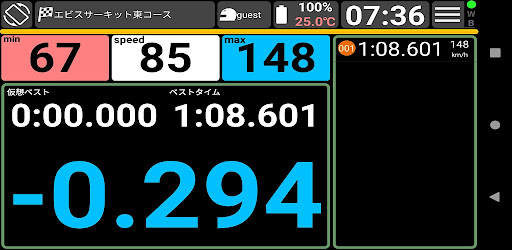
Displays and records lap times, sector times, time difference from best lap, vehicle speed, etc. in real time.
Lap time audio notifications are available.
※Starting with Ver. 5.0, time difference from best lap can also be displayed in real time.
When using the smartphone's built-in GPS (1 Hz), the real-time display may not display correctly on mini circuits close to the track. In such cases, please disable the real-time display.
We recommend using an external GPS (5 Hz or 10 Hz) with Bluetooth connectivity.
● View Driving Data List
Driving data is saved by date, and you can view and sort lap times, top and bottom speeds, and more for each sector.
You can also register notes and search keys for each driving data.
● Display Driving Lines on the Course Map for Data Analysis
Driving lines and top and bottom speeds for each corner are displayed on the course map, and driving history can be replayed with the PLAY button.
You can also overlay the driving lines of two laps for easy comparison of braking point differences, cornering speeds, and top speeds.
● Create Unregistered Courses Freely
You can easily create a course by simply tapping the map on the screen.
You can distribute it via QR code.
You can set up to four sectors.
You can search for map coordinates by facility name (such as "XX Circuit") or address.
*Unregistered courses will be added as they become available.
Please contact us at the inquiry desk listed below.
● Measurement screen display items can be selected from the following.
- Current lap time, best lap, and virtual best.
The difference from the best lap is also displayed here.
- Current speed, top speed per sector, and bottom speed.
- Past times are displayed as a list.
● Backup/Restore
All data from this app can be backed up to an SD card and then restored to another smartphone or tablet.
● Using an External GPS
To connect to an external GPS, you must also use an app such as Bluetooth GPS.
Using an external GPS allows recording at up to 10Hz (10 times per second).
This app supports GPS frequencies of 10Hz, 5Hz, 2Hz, and 1Hz.
When using the smartphone's internal GPS, recording is limited to 1Hz due to the smartphone's specifications.
For more accurate time measurement and analysis, we recommend using a 10Hz or 5Hz external GPS.
Operation has been confirmed with external GPS from the DG-PRO1s, 747pro, and Photomate887. (We recommend the DG-PRO1s, which is capable of recording at 10Hz.)
*We will continue to add unregistered courses. Please contact us at the inquiry desk listed below.
*Please feel free to contact us with any functional issues or requests.
*As of version 4.0, the function to export driving data in CSV format has been discontinued due to the recording of detailed data.
-------------------------------------------------------------------------------------------------------------------------
Aomori Speed Park
Akechi Hilltop Circuit
Asan Circuit
Ishino Circuit
Itako Motorsports Park
Inagawa Circuit
Iwai Circuit
HSR Kyushu Circuit
AZ Yamanashi Circuit
Ebisu Circuit West Course
Ebisu Circuit East Course
Auto Sports Land Sunagawa
Autopolis
Auto Land Sakute
Auto Land Techno
Okayama International Circuit
Okegawa Sports Land
Owara Circuit
Kinki Sports Land
Gunma Cycle Sports Center
Ks K Circuits
Koda Circuit
GOLDEX Honjo Motor Park
Circuit Azumino
Sakai Kartland
Southern Circuit
Shiraito Speedland
Shiraoi Car Land
Shin-Tokyo Circuit
Suzuka Circuit
Suzuka Circuit South Course
Suzuka Twin Circuit
SPA Naoiri
Spa Nishiura Motor Park
Sportsland SUGO
Sportsland Yamanashi
Seto Inland Sea Circuit
Central Circuit
Sodegaura Forest Raceway
Tacas Circuit
Twin Ring Motegi
Twin Ring Motegi North Course
Twin Ring Motegi South Course
Tsukuba Circuit 1000
Tsukuba Circuit 2000
Tsukuruma Circuit Nasu
TS Takata
Tokachi Speedway
Tokushima Kartland
Tomin Motorland A Course
Tomin Motorland B Course
Nakayama Circuit
Nasu Motor Sportsland
Nippon Automobile College NATS Circuit
Narita Motorland
Nikko Circuit
Nürburgring
Neo Speed Park
Hero Shinoi Circuit
Bihoku Highland Course A
Bihoku Highland Course B
Fuji Speedway (New Sector)
Fuji Speedway Short Course
Hokkaido Speed Park
Mase Circuit
Mihama Circuit
Motorland Suzuka
Motorland Mikawa
Mobara Twin Circuit Short Course
Mobara Twin Circuit Long Course
Link Circuit
YZ Circuit
Developer email
mr_cybercafe@yahoo.co.jp
Developer website
https://mlap.sakura.ne.jp/manualCurrent version
5.8.32 スタートとゴールが異なるコースに対応、特定条件でクラッシュする問題を修正
Android version
7.0
Screenshots