Cute Note Widget
chlorocube

4.8 stars694 reviews10,000+Free
PersonalizationEveryoneVersion 1.3.0Updated 9/20/2026, 4:34:58 AM
Open in StoreThis is a note widget that can be placed on your home screen.
A sophisticated, pretty, and easy-to-read design.
What you can customize:
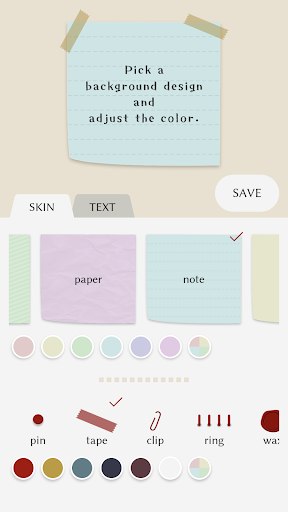
- Change the background design and color
- Adjust the text font, size and color
- Adjust the line spacing and padding of the text
- Add multiple note widgets to your home screen
- Resize the note widgets on your home screen
- Register up to 5 colors of your choice (for both background design color and text color)
- Duplicate a note
To place a note widget on your home screen:
Please follow the steps below:
https://support.google.com/android/answer/9450271?hl=en
To edit the contents of a note:
Method 1: Tap the note widget on your home screen to open the edit screen.
Method 2: Open the CuteNoteWidget app and tap the note from the list to open the edit screen.
To duplicate a note:
You can only duplicate data from an existing note when creating a new note widget.
1. Tap the red database icon at the upper-right corner of the edit screen.
2. Tap the note from the list to duplicate it.
Languages currently supported:
English, Japanese
(*) This app includes fonts that support the Japanese language.
A sophisticated, pretty, and easy-to-read design.
What you can customize:
- Change the background design and color
- Adjust the text font, size and color
- Adjust the line spacing and padding of the text
- Add multiple note widgets to your home screen
- Resize the note widgets on your home screen
- Register up to 5 colors of your choice (for both background design color and text color)
- Duplicate a note
To place a note widget on your home screen:
Please follow the steps below:
https://support.google.com/android/answer/9450271?hl=en
To edit the contents of a note:
Method 1: Tap the note widget on your home screen to open the edit screen.
Method 2: Open the CuteNoteWidget app and tap the note from the list to open the edit screen.
To duplicate a note:
You can only duplicate data from an existing note when creating a new note widget.
1. Tap the red database icon at the upper-right corner of the edit screen.
2. Tap the note from the list to duplicate it.
Languages currently supported:
English, Japanese
(*) This app includes fonts that support the Japanese language.
Developer email
chlorocube@gmail.com
Developer website
https://chlorocube.github.io/Released
Jan 14, 2023
Current version
1.3.0
Android version
8.0
Reviews & Ratings
4.8
out of 5
5
4
3
2
1
🌟 Loved by users
694 reviewsScreenshots